
UP Scholarship is one of the biggest schemes run by the Social Welfare Department of the Uttar Pradesh Government. The main purpose of this scheme is to provide financial help to poor and economically weak students (SC, ST, OBC, Minority and General Category) of the state so that they can complete their education.
Every year, lakhs of students apply online through the up-scholarship portal for Pre-Matric (9th and 10th) and Post-Matric / Dashmottar (11th, 12th, Graduation, Post-Graduation, Diploma). Here you will get every single piece of information about UP Scholarship in detail.
Useful Important Server Links
| Apply Online (Registration) | Server I | Server II | Server III |
| Login to Complete Form | Intermediate | Other Then Intermediate |
| Login Other Then Intermediate (Renewal Candidates) | Server I | Server II | Server III |
| Login Intermediate (Renewal Candidates) | Server I | Server II |
Important Points (Table of Contents)
- What is UP Scholarship ?
- Eligibility Criteria
- Required Documents
- OTR Registration Step-by-Step Process
- How to Apply Online for UP Scholarship?
- Renewal Process
- Application Status Check
- Payment Status Check
- How to Correct Mistakes in Form?
- Types of Scholarship
- Benefits of Scholarship
- Important Dates
- Contact / Helpline Details
- FAQs
What is UP Scholarship ?
Main Objective of the Scheme
The main objective of UP Scholarship is to provide financial assistance to those students of Uttar Pradesh who are unable to pay their fees. Through this, the state government sends tuition fee reimbursement and maintenance allowance directly to the students' bank accounts.
UP Scholarship Portal (SAKSHAM)
To make the scholarship system transparent and accessible, the Uttar Pradesh Government has launched scholarship.up.gov.in (SAKSHAM Portal). From here, students can do fresh registration, renewal, and track their status from home.
Important Points
- The application process is completely online and free.
- It is mandatory that the student's bank account is linked to Aadhaar (Aadhaar Seeded / NPCI Mapped).
- Renewal students do not need to do fresh registration; they can login using their old registration number.
Eligibility Criteria for UP Scholarship
General and Income Related Eligibility
- Applicant must be a permanent resident (Domicile) of Uttar Pradesh.
- Applicant must be enrolled in a recognized school, college or university in the state.
- Pre-Matric (Class 9-10): Annual family income should not exceed ₹1,00,000 for all categories.
-
Post-Matric (Class 11-12 & Higher):
- For General / OBC / Minority, maximum annual income should be ₹2,00,000.
- For SC / ST category, maximum annual income should be ₹2,50,000.
- Student should not be availing any other state or central government scholarship.
Required Documents for UP Scholarship
| Document Type | Description | Importance |
|---|---|---|
| Passport Size Photo | Latest colored photo (up to 20KB) | Mandatory |
| Aadhaar Card | Aadhaar card must be linked to mobile number and bank account (NPCI Seeded) | Mandatory |
| Income Certificate | Valid income certificate issued by competent authority | Mandatory |
| Caste Certificate | If student belongs to SC, ST, or OBC category | Required |
| Residence Certificate | Domicile Certificate of Uttar Pradesh | Mandatory |
| Fee Receipt / Fee Details | Receipt of non-refundable fee issued by institution | Mandatory |
| Previous Year Marksheet | Marksheet of last passed examination | Mandatory |
| Bank Passbook | Bank account must be in student's name (first page copy) | Mandatory |
| Enrollment Number | Registration number of board or university | Mandatory (for Freshers) |
NPCI Mapping Mandatory
The Uttar Pradesh Government has made it mandatory that the scholarship amount will be sent through Aadhaar Based Payment System (ABPS). Therefore, before filling the form, go to your bank and ensure whether your account is mapped with NPCI (National Payments Corporation of India) (Aadhaar Seeded) or not.
OTR Registration Process (One Time Registration)
To make the application process on the UP Scholarship portal even simpler, it has now become mandatory for students to do their One Time Registration (OTR) before applying. The step-by-step process of OTR registration through the official website is given below:
Step 1: Go to the Official Website
First, go to the official UP Scholarship website scholarship.up.gov.in.
Official UP Scholarship WebsiteStep 2: Choose OTR Registration Option
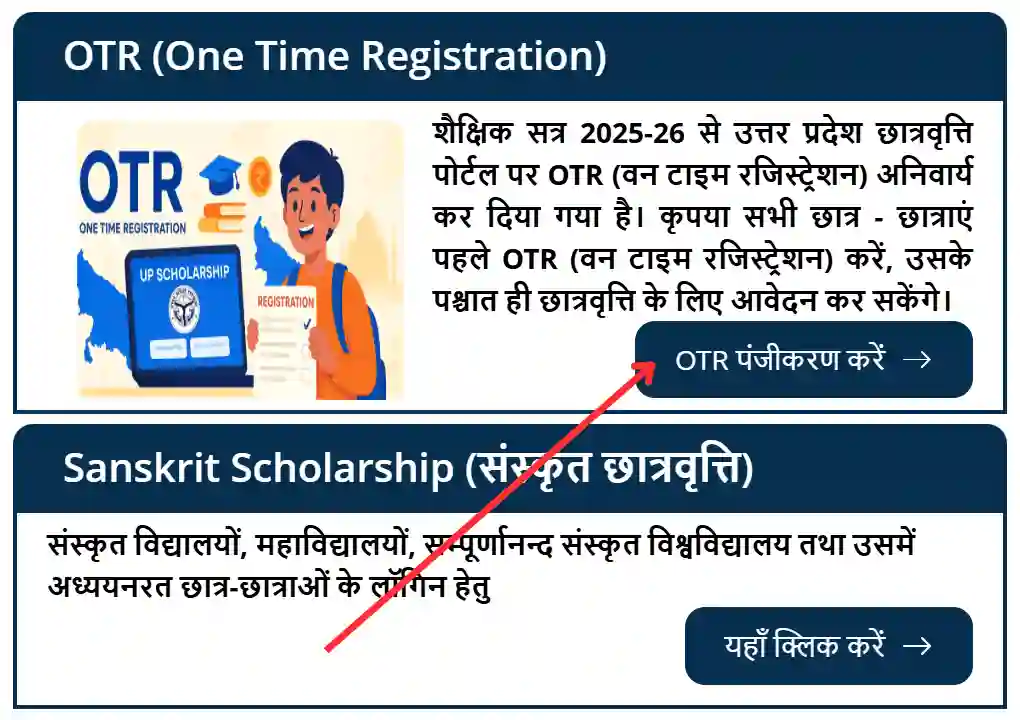
On the homepage, go to the "Student" section and click on the "One Time Registration (OTR)" option.
Step 3: Do Mobile Verification
- Enter your mobile number (the same number linked to Aadhaar).
- Choose your category (SC, ST, OBC, Minority, General).
- Enter the captcha code and click on the "Generate OTP" button.
- Verify by entering the OTP received on your mobile.
Step 4: Complete eKYC
- Enter your Aadhaar number.
- Enter the captcha code.
- Click on the "Submit" button to complete the eKYC process.
Step 5: Fill Final Information and Get OTR
- Enter Father's name (as per Aadhaar card).
- Enter Mother's name (as per Aadhaar card).
- Enter Email ID (active and valid).
- Enter the captcha code and click on the "Submit" button.
Step 6: Keep OTR Slip Safe
After submitting all information, your OTR number will be generated. Download this slip and take a printout, because it will be very important for future scholarship applications and login.
How to Fill UP Scholarship Online Form?
If you are applying for the first time, select the 'Fresh' option. The step-by-step application process is given below:
Step 1: Do Registration
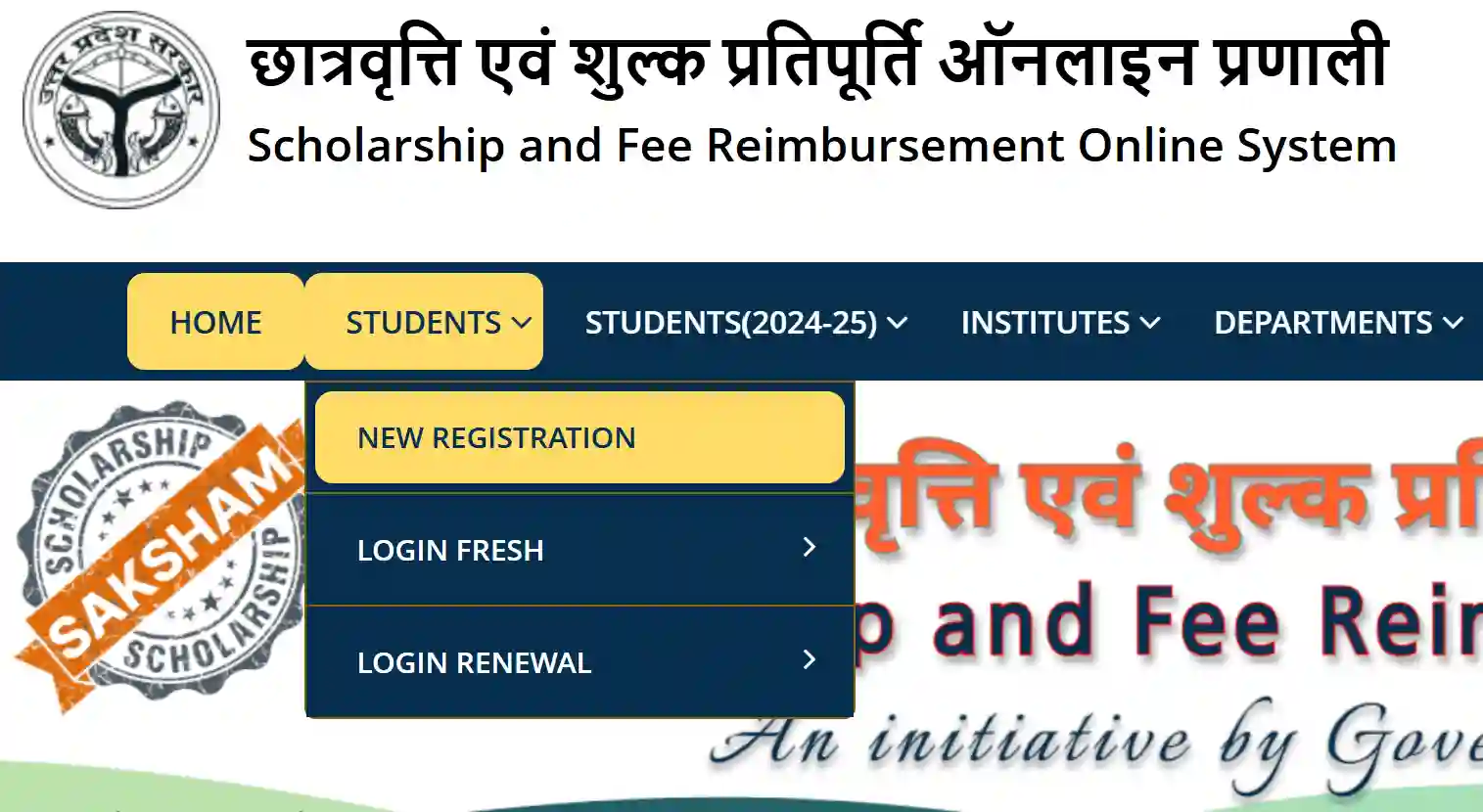
First, go to the official website scholarship.up.gov.in. In the "Student" menu, click on "Registration". Choose your category (SC/ST/Gen/OBC/Minority) and course (Pre/Post Matric). Fill in the basic information asked (name, mobile, aadhaar number), create a password and complete the registration.
Step 2: Student Login
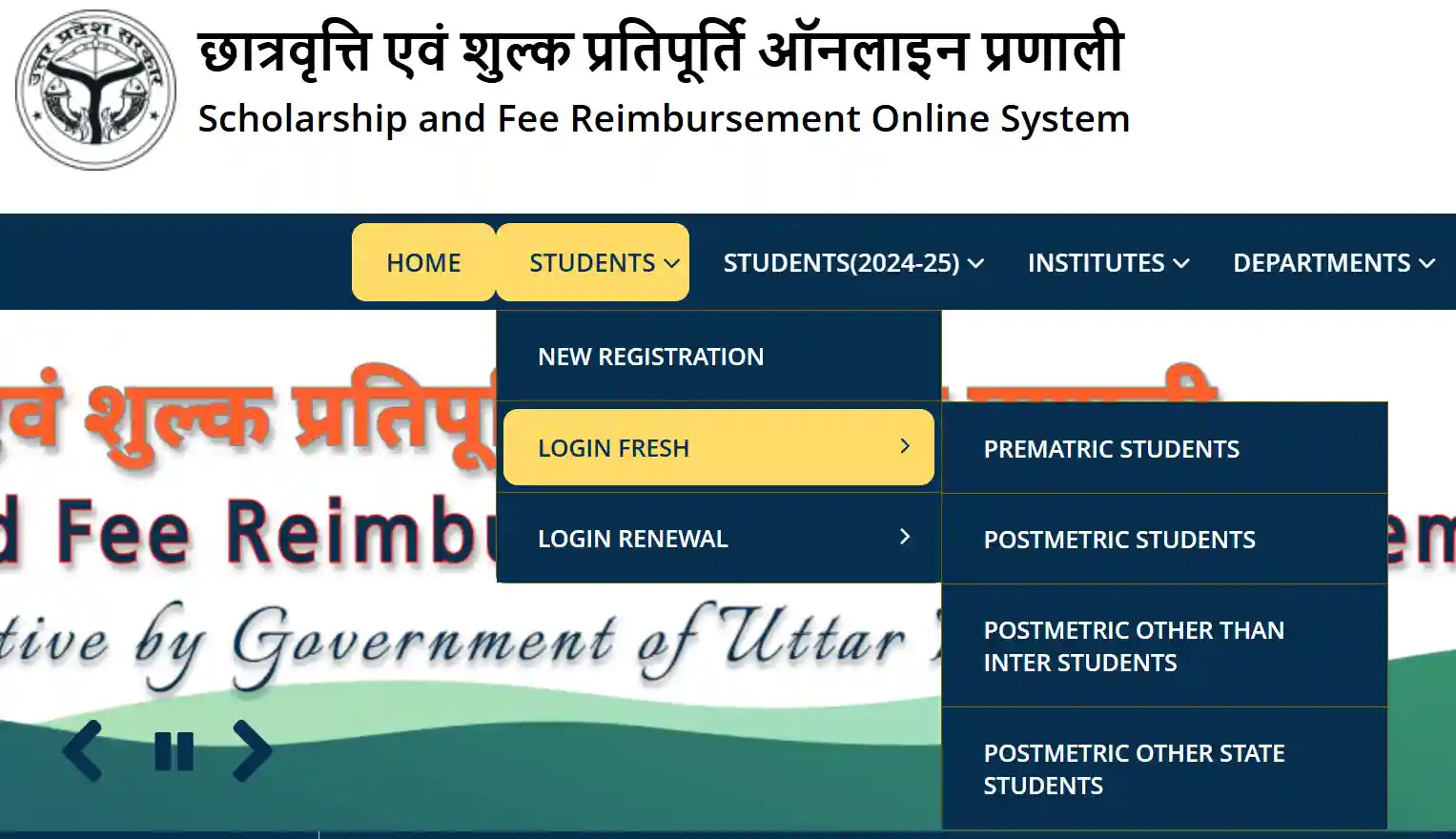
Using the registration number and created password, do "Fresh Login".
Step 3: Aadhaar Authentication
After logging in, complete the verification and authentication (Demographic & OTP Authentication) of your Aadhaar.
Step 4: Fill Application Form
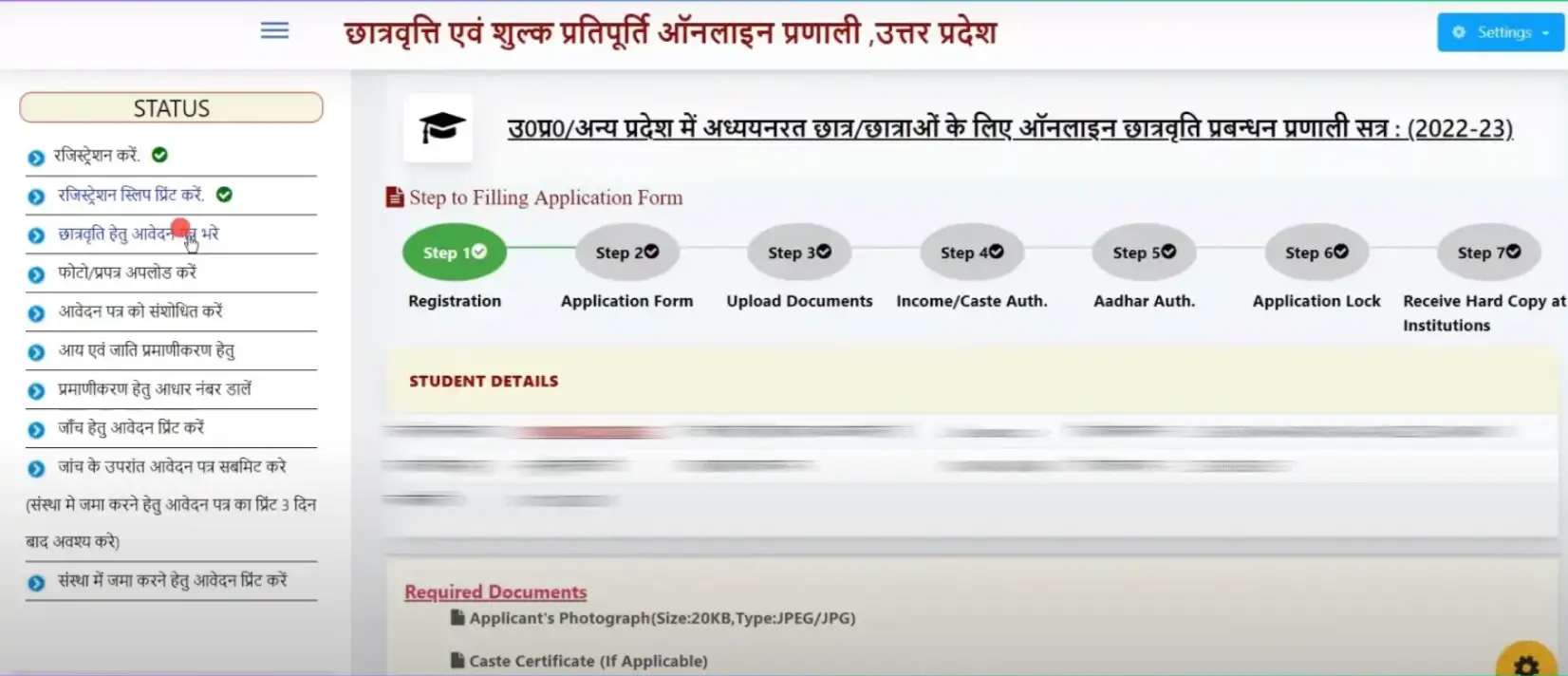
Now click on "Fill Application Form". Here, carefully enter your educational, personal, income/caste, and bank details.
Step 5: Upload Photo
Upload your latest passport size photo. Keep in mind, the photo size should not exceed 20KB.
Step 6: Print for Checking
After filling all the information, take a "Print for Checking" and get it cross-verified from your school/college.
Step 7: Final Submit
If everything is correct in the check, then return to
the portal and do "Final Submit" of the
form.
Note: No corrections can be made after final submit.
To make corrections, you will have to login and
correct your form.
Step 8: Submit Hard Copy to College
3 working days after final submit, take a final printout and submit it to your school/institution along with the required documents.
UP Scholarship Renewal Process
Students who have received scholarship in the previous year and have taken admission in the next year of the same course (like B.A. 2nd Year or 12th), they need to do Renewal instead of new application.
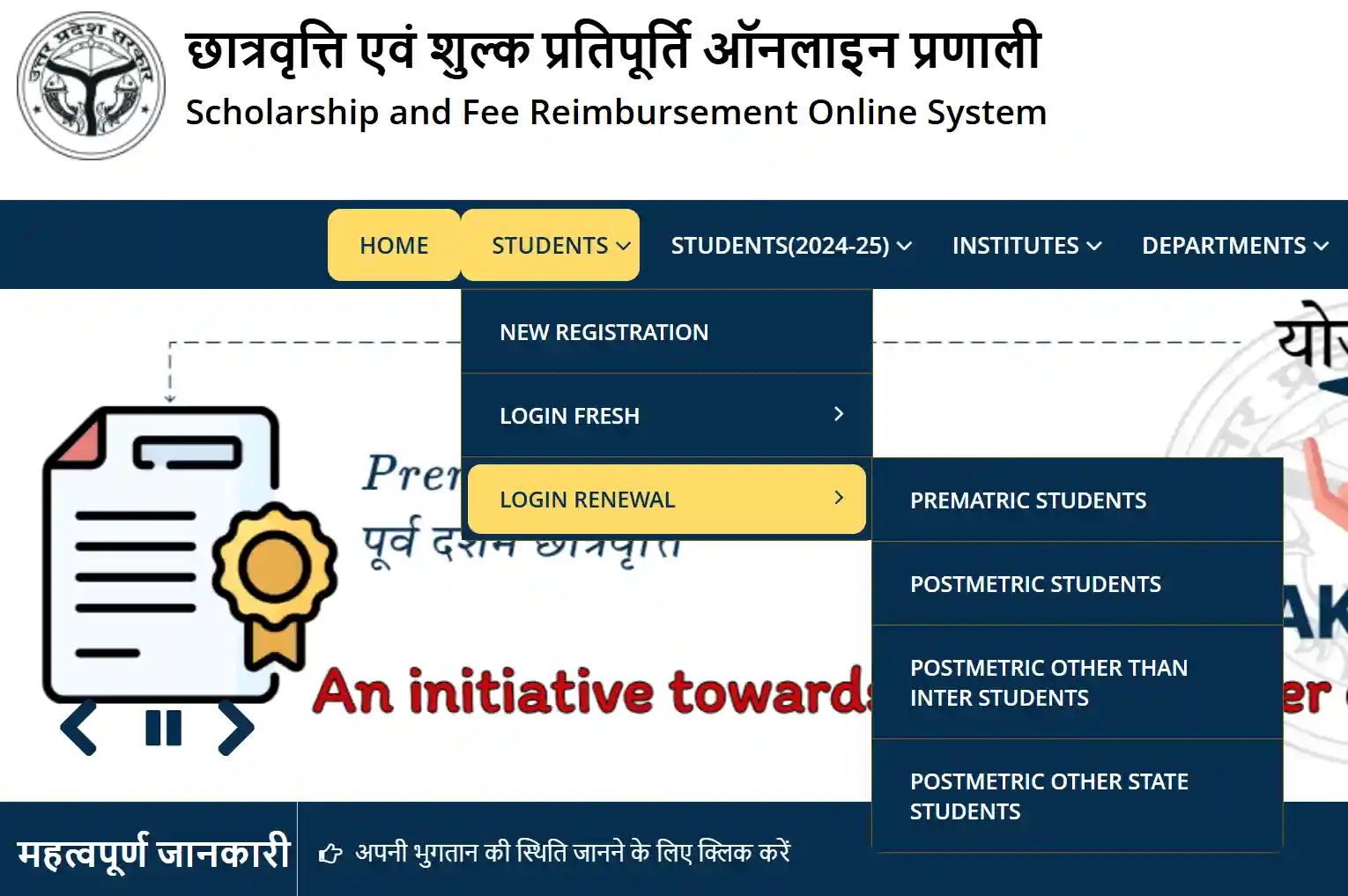
Step 1: Go to Renewal Login
On the UP Scholarship portal, go to the 'Student' menu and select the "Renewal Login" option.
Step 2: Login with Old Credentials
Login using your previous year's registration number, date of birth and password. If you have forgotten the password, use 'Forgot Password'.
Step 3: Update Latest Information
After logging in, you only need to update your previous class's marks/total marks and the current year's fee receipt number and enrollment date.
Step 4: Aadhaar Authentication and Submit
Complete the Aadhaar authentication process and after checking, final submit the form. Finally, take its printout and submit it to your institution along with the relevant documents.
Application Status Check
After submitting the application and after the hard copy is verified by the college, you can track the current status of your form online. The detailed process to check status through the portal is given below:
Step 1: Go to Official Website
First, go to the official UP Scholarship website scholarship.up.gov.in.
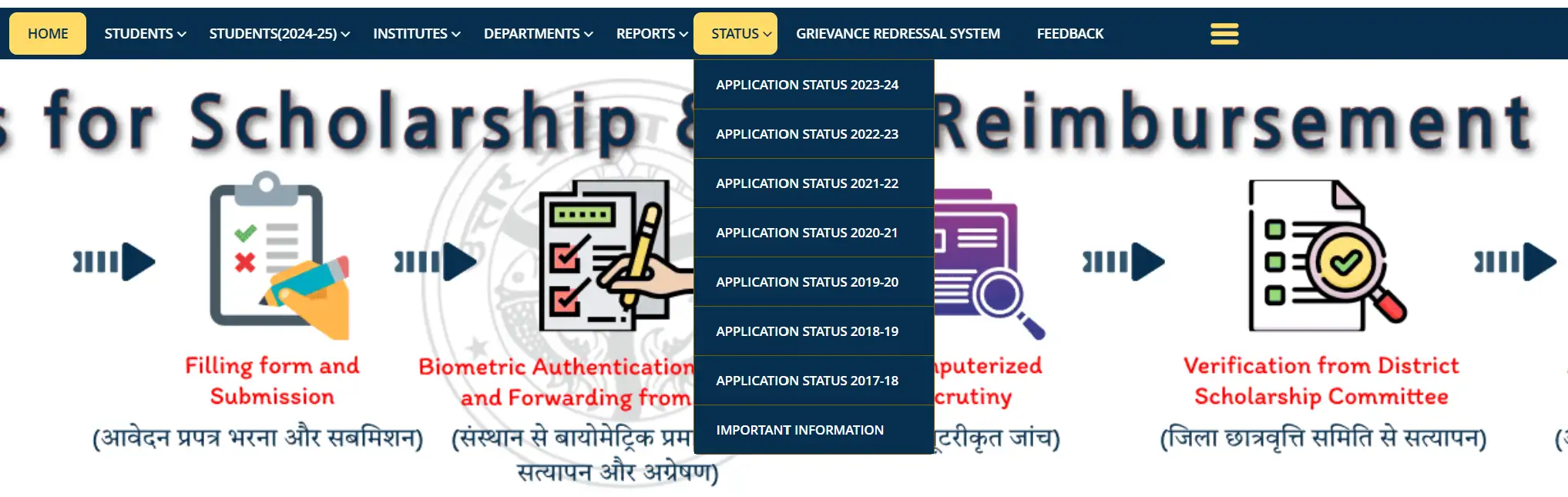
Step 2: Click on 'Status' Tab
Click on the "Status" tab given in the menu bar on the homepage and select the relevant academic year from the dropdown menu (like Application Status 2025-26).
Step 3: Enter Your Details
Now a new page will open on the screen. Here, correctly enter your Registration Number and Date of Birth (DOB) and click on the 'Search' button.
Step 4: See Your Status
Upon searching, the complete status of your form will appear on your screen. In this, you will be able to see at what level your form is pending or approved, whether it is Forwarded by Institute, Pending at District Scholarship Committee, or Verified/Rejected by DWO.
Payment Status Check
Once the Social Welfare Department (DWO) approves your application, the scholarship amount is transferred directly to your bank account (DBT) through the PFMS system. Its status can be checked as follows:
Step 1: Go to PFMS Portal
First, go to the Government of India's Public Financial Management System (PFMS) portal pfms.nic.in.
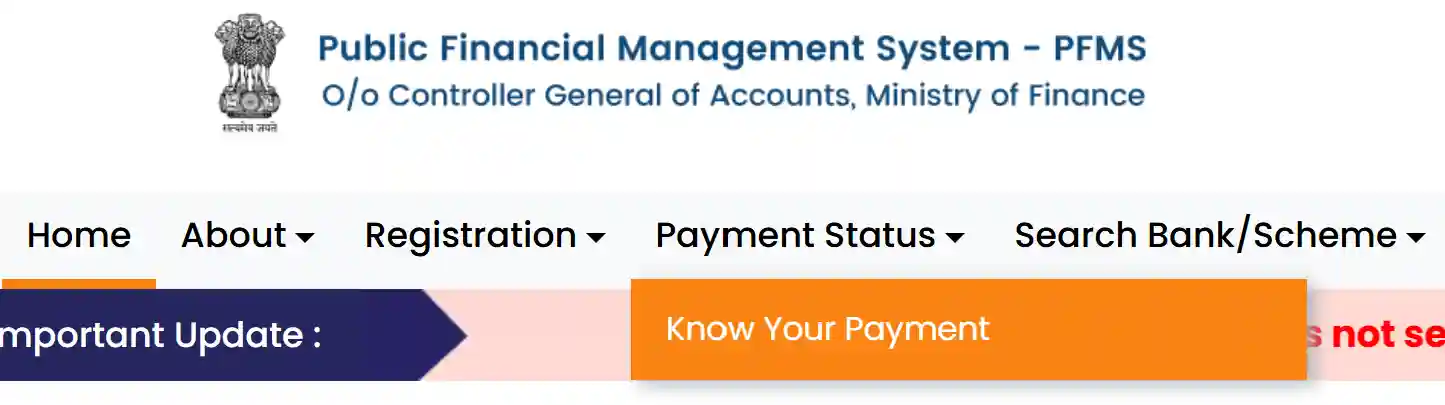
Step 2: Choose 'Know Your Payment' Option
Find the "Know Your Payment" option on the website's homepage and click on it.
Step 3: Enter Bank Information
Type your bank's name (a list will appear as you type, select your bank from it) and enter your Account Number twice to confirm.
Step 4: Do OTP Verification
Correctly fill the Captcha code given on the screen and click on the "Send OTP on Registered Mobile Number" button.
Step 5: Check Payment Status
An OTP will be received on your mobile number linked to the bank account, enter it to verify. After OTP verification, you will immediately know whether the amount sent by the department has been "Success" in your account or is still "Under Processing".
How to UP Scholarship Correction ?
If there is any error in your application (like income certificate number, previous year's marks, fee etc.), then the department opens a Correction Form portal. The correction process is as follows:
Step 1: Log in to the Portal
Between the correction dates set by the department, go to the UP Scholarship portal and log in to the student dashboard using your login credentials (registration number, date of birth and password).
Step 2: Choose 'Modify Application' Option
After logging in, click on the "Modify Application After Initial Submission" link given on the dashboard.
Step 3: Correct the Error and Submit
Now your form will open again. Carefully correct the wrong information wherever it was entered. After making all the corrections, check the form well and final submit again.
Step 4: Submit New Printout
After final submit, take a new printout of the corrected application form. It is mandatory to submit this new printout again to your college/institution along with the required documents, otherwise your correction will not be valid.
Types of Scholarship
Pre-Matric
This scholarship is for students studying in class 9 and 10. It encourages students to continue their studies at the initial level.
Post-Matric Inter
This scholarship is for students enrolled in class 11th and 12th. Under this, students of all streams - Science, Commerce and Arts - are covered.
Dashmottar (Other than Inter)
This scholarship is for students pursuing higher education, such as Graduation (BA, BSc, BTech), Post-Graduation (MA, MSc, MBA), Medical, Diploma, Certificate courses, and PhD.
Benefits of Scholarship
Important Dates
The dates given below are tentative. Please see the official notification on the official portal for exact dates:
| Event | Pre-Matric (9-10) | Post-Matric (11-12 & UG/PG) |
|---|---|---|
| Online Application Start | July / August 2026 | August / September 2026 |
| Last Date for Online Application | October 2026 (Tentative) | December 2026 (Tentative) |
| Last Date to Submit Hard Copy in Institution | November 2026 | January 2027 |
| Correction Form | December 2026 | February 2027 |
| Scholarship Distribution in Account (PFMS) | February - March 2027 | March - April 2027 |
UP Scholarship Helpline
Social Welfare Department, Uttar Pradesh
| OBC, Minority, General, SC, ST Helpline | 18001805131 / 18001805229 (Toll-Free) |
| CM Helpline Number | 1076 |
| Official Website | https://scholarship.up.gov.in/ |
| PFMS Portal | https://pfms.nic.in/ |
Note
The UP Scholarship portal is completely secure and managed by the state government. Do not share your login ID, password or bank details with any outsider or website. Scholarship comes directly to your account through DBT (Direct Benefit Transfer).
FAQs - UP Scholarship 2026
Question: When will the online forms for UP Scholarship 2026 start?
Answer: Generally, applications for Pre-Matric start in July-August and for Post-Matric start in August-September. Please keep checking the official website.
Question: I have forgotten my UP Scholarship password, what should I do?
Answer: You can click on the "Forgot Password for Dashmottar / Pre Matric" option on the login page. You can generate a new password by entering your registration number, date of birth and high school roll number.
Question: My form status shows "Pending at District Scholarship Committee", what does that mean?
Answer: This means that your form has been verified by your college and sent to the Social Welfare Department (DWO), and the officials are currently checking your documents. Soon it will change to "Verified" or "Rejected".
Question: Why is NPCI Mapping (Aadhaar Seeding) necessary?
Answer: The government now sends the scholarship amount based on Aadhaar number (Aadhaar Based Payment), not on the basis of account number. The money will go to the bank account in which your Aadhaar is mapped with NPCI. Without this, scholarship will not be received.