
e-Shram Card is a flagship initiative by the Ministry of Labour and Employment, Government of India. The main purpose of this scheme is to create a national database of unorganized workers (construction workers, domestic help, street vendors, agricultural workers, etc.) and provide them with a unique Universal Account Number (UAN). This helps in extending social security benefits to crores of workers across the country.
Every year, lakhs of unorganized workers register online through the e-Shram portal to get their e-Shram card. The scheme provides accidental insurance cover of Rs. 2 lakh and helps workers access various government schemes. Here you will get every single piece of information about e-Shram Card in detail.
Important Points (Table of Contents)
What is e-Shram Card?
Main Objective of the Scheme
The main objective of e-Shram Card is to create a national database of unorganized workers including construction workers, migrant workers, gig workers, platform workers, domestic workers, street vendors, agricultural workers, and other unorganized sector workers. The government provides a unique Universal Account Number (UAN) to each registered worker.
e-Shram Portal (eshram.gov.in)
The Ministry of Labour and Employment has launched the e-Shram portal (eshram.gov.in) to register unorganized workers. From here, workers can do self-registration, download their e-Shram card, check status, and update their information online.
Important Points
- The registration process is completely online and free.
- It is mandatory to have an Aadhaar card linked to mobile number for registration.
- Each worker gets a unique Universal Account Number (UAN).
- The e-Shram card is valid for lifetime with no renewal fee.
Eligibility Criteria for e-Shram Card
Who Can Apply for e-Shram Card?
- Applicant must be an Indian citizen.
- Age should be between 16 to 59 years.
- Worker must be from the unorganized sector (construction, domestic work, street vending, agriculture, etc.).
- Should not be covered under any other social security scheme like EPFO, ESIC, etc.
- Should not be an income tax payer.
- Worker must have a valid Aadhaar card linked to mobile number.
Required Documents for e-Shram Card
| Document Type | Description | Importance |
|---|---|---|
| Aadhaar Card | Aadhaar card must be linked to mobile number | Mandatory |
| Mobile Number | Mobile number linked with Aadhaar for OTP verification | Mandatory |
| Bank Account (Optional) | Bank account details for direct benefit transfer | Optional |
| Ration Card (Optional) | For family details verification | Optional |
| Occupation Proof (Self Declaration) | Self declaration of occupation in unorganized sector | Mandatory |
| Educational Qualification (Self Declaration) | Self declaration of education level | Mandatory |
Aadhaar Linking Mandatory
The Government of India has made it mandatory to have Aadhaar card linked to mobile number for e-Shram Card registration. Without Aadhaar authentication, registration is not possible. Make sure your mobile number is registered with Aadhaar.
e-Shram Card Registration Process
Follow these steps to register for e-Shram Card online:
Step 1: Go to the Official Website
First, go to the official e-Shram website eshram.gov.in.
Official e-Shram Website
Step 2: Click on 'Register on e-Shram'
On the homepage, click on the "Register on e-Shram" button.
Step 3: Enter Aadhaar Number
- Enter your 12-digit Aadhaar number.
- Enter the captcha code.
- Click on "Validate Aadhaar" button.
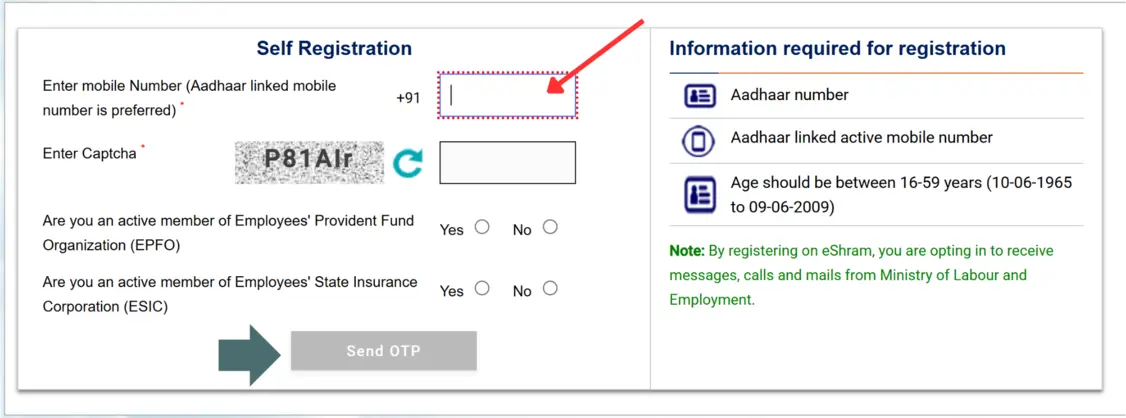
Step 4: Aadhaar OTP Verification
- An OTP will be sent to your Aadhaar-linked mobile number.
- Enter the OTP and click on "Verify OTP".
Step 5: Fill Personal Information
- Name (auto-filled from Aadhaar).
- Date of Birth (auto-filled from Aadhaar).
- Gender and Category (SC/ST/OBC/General).
- Educational Qualification.
- Disability status (if any).
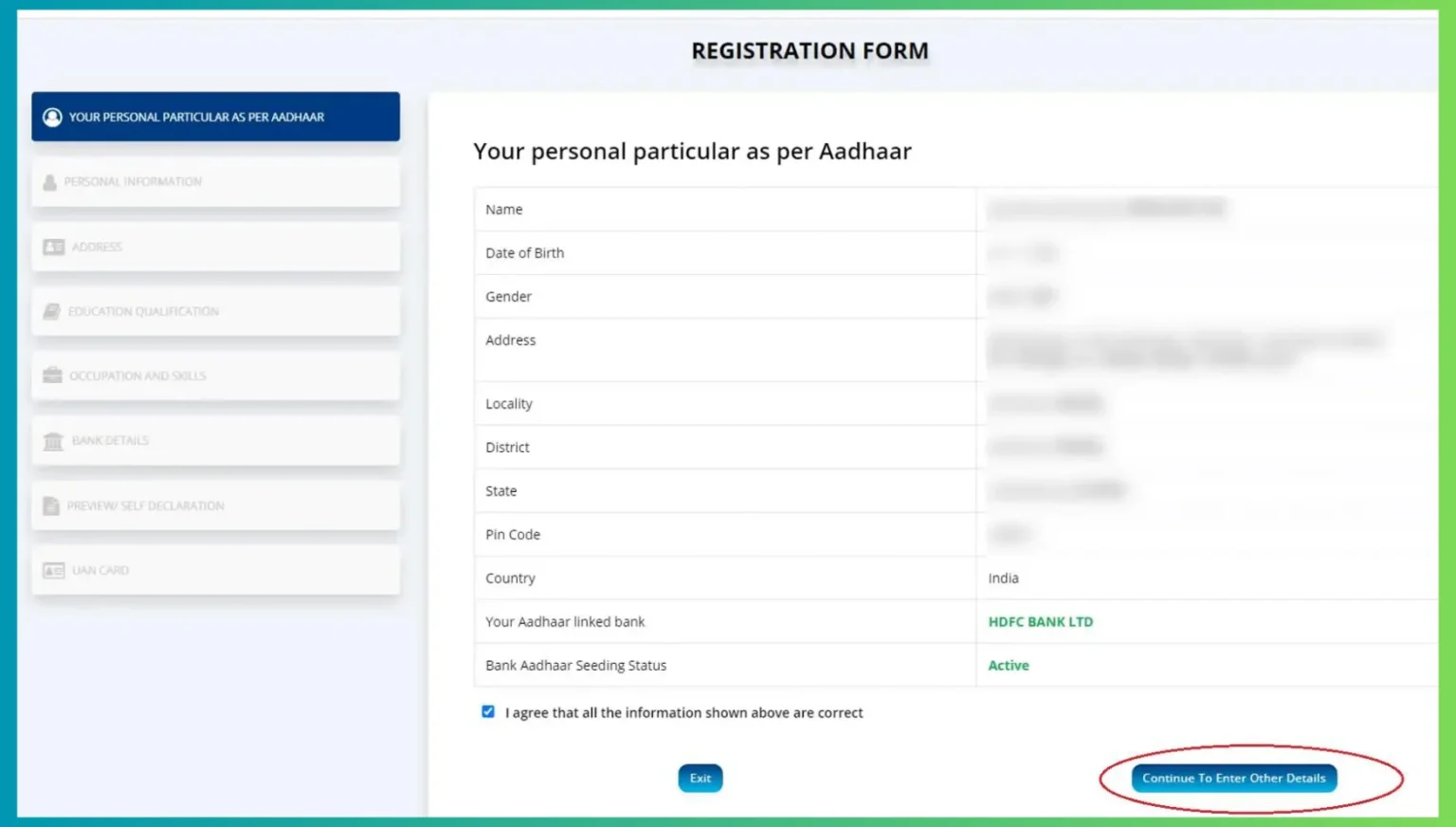
Step 6: Fill Address Details
- State, District, Block, Village/City.
- Pincode and address details.
Step 7: Fill Occupation Details
- Select your occupation from the list (Construction, Agriculture, Domestic Work, Street Vending, etc.).
- Enter work details and sub-category.
Step 8: Fill Bank Account Details (Optional)
- Bank Name, Account Number, IFSC Code (for direct benefit transfer).
Step 9: Submit and Get e-Shram Card
After filling all details, click on "Submit". Your e-Shram card will be generated instantly with a unique Universal Account Number (UAN). You can download the card immediately.
📋 E Shram Card List Check Online
If you want to check or download the E Shram Card List online, follow these steps:
Step 1: Visit Official Website
Go to the official e-Shram portal website eshram.gov.in. You can use this link to visit the official website.
E Shram Card Home PortalStep 2: Click on 'E Shram Data Access'
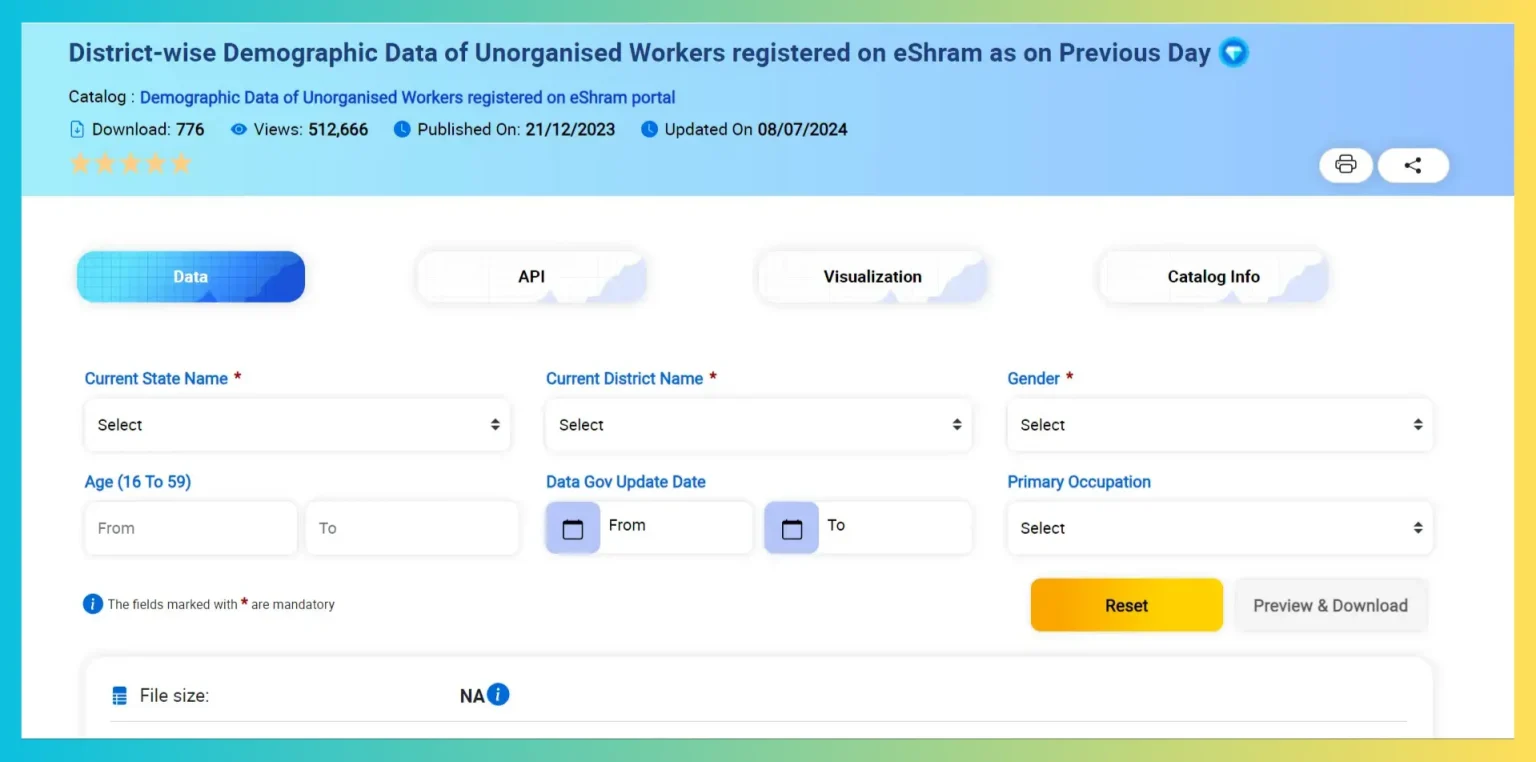
After reaching the homepage, scroll down and click on the "E Shram Data Access" button.
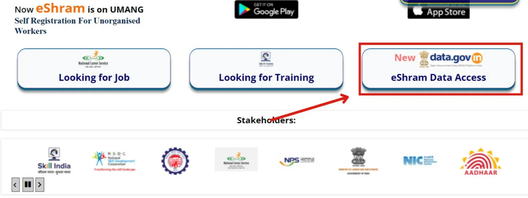
Step 3: Fill the Form
A new form page will open. Fill in the required information such as:
- State Name
- District Name
- Gender
- Age
- Employment/Occupation
After filling the details, click on "Preview and Download" button.
Step 4: View the List
The E Shram Card list will appear on your mobile or laptop screen. You can check your name in this list.
Step 5: Login/Register to Download
To download the E Shram Card list, click on the "Download" button, then click on "Login/Register" button.
Step 6: Login to Your Account
Enter your registered mobile number and password, then click on "Login" button to access your Meri Pehchaan account.
Step 7: Download the List
Once logged in, the E Shram Card list will start downloading. You can view it in your mobile or laptop's download folder and take a printout if needed.
Note
If you have not created a "Meri Pehchaan Account" before, first register on Meri Pehchaan Account and create a login password.
✅ E Shram Card Status Check Online
If you want to know whether your e-Shram Card has been created or not, you can check your E Shram Card status online from home. Follow these steps:
Step 1: Visit Official Website
First, go to the official e-Shram website eshram.gov.in.
Step 2: Click on 'Register on eShram'
On the homepage, you will see the "Register on eShram" option. Click on this link.
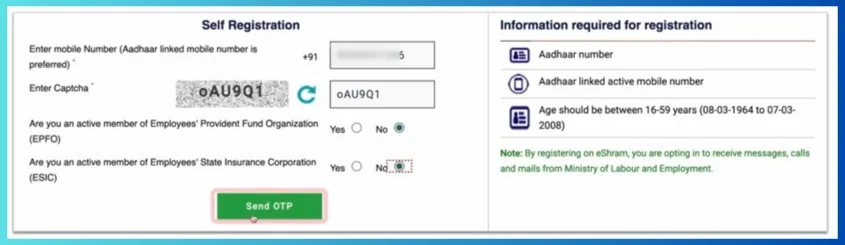
Step 3: Enter Mobile Number
Enter your mobile number linked to Aadhaar card and the captcha code, then click on "Send OTP" button.
Step 4: Verify OTP
An OTP will be sent to your Aadhaar-linked mobile number. Enter the OTP and click on the submit button.
Step 5: Enter Aadhaar Number
In the next step, enter your Aadhaar number and enter the OTP received on your Aadhaar-linked number.
Step 6: Complete Captcha and Submit
Enter the captcha code, check the "I Agree" checkbox, and click on the "Submit" button.
Step 7: Check Status
If your e-Shram card has been created, you will see the message: "This Aadhaar is already registered on eShram portal. To update your profile or download UAN card please click here" on your device screen. This way you can check the status of your e-Shram card application.
Note
If your e-Shram card appears on your mobile or laptop screen, you should download your e-Shram card immediately.
⬇️ E Shram Card Download PDF
If you have applied for an e-Shram Card and want to download it, follow all the steps given below:
Step 1: Visit Official Website
First, go to the official e-Shram website: https://eshram.gov.in/.
E Shram Card Download PortalStep 2: Click on Login
On the homepage, you will see the "Login" option in front of "Already Register". Click on this link.
Step 3: Enter Login Credentials
A new page will open. Enter your UAN Number, Date of Birth, and Captcha code.
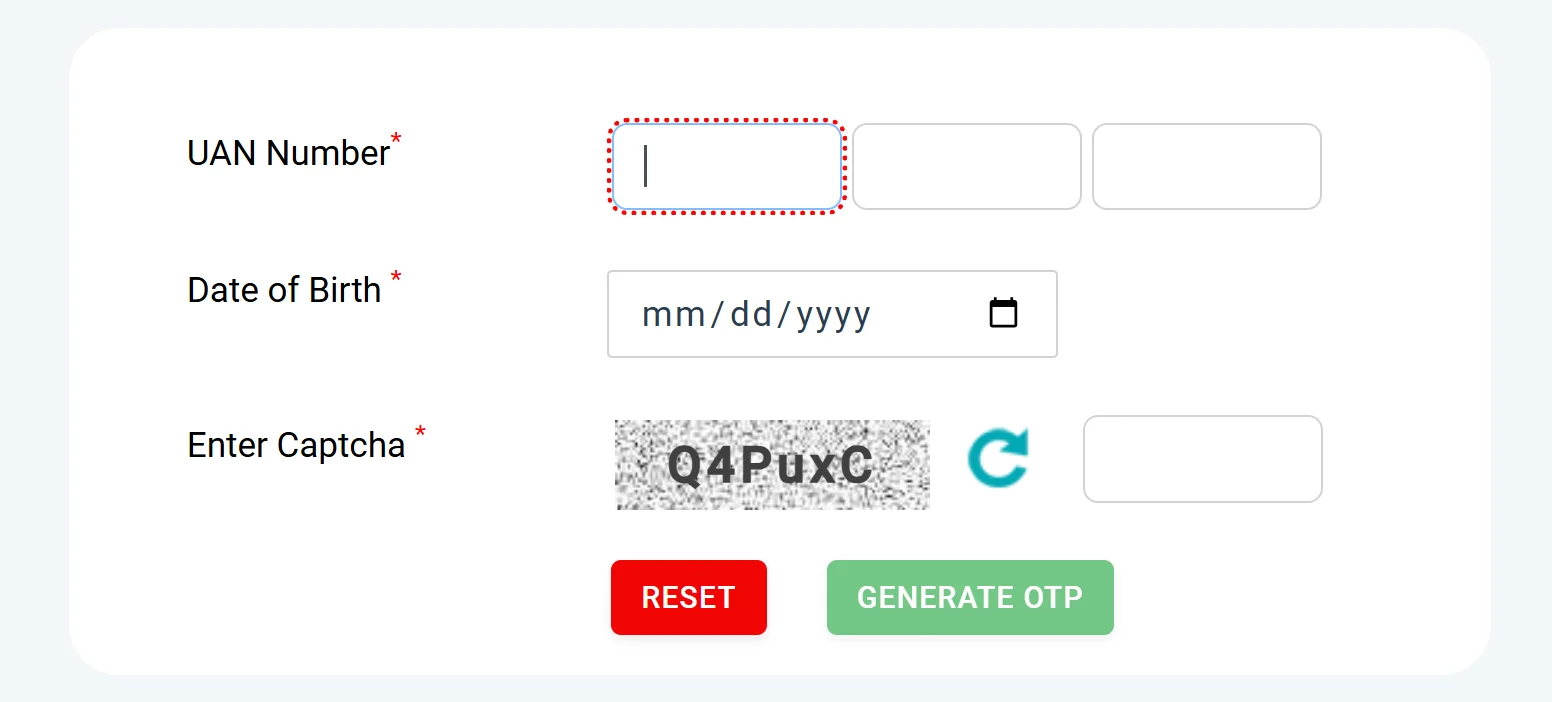
Step 4: Generate OTP
Click on the "Generate OTP" button. An OTP will be sent to your registered mobile number.
Step 5: Login
Enter the OTP and click on login to access your dashboard.
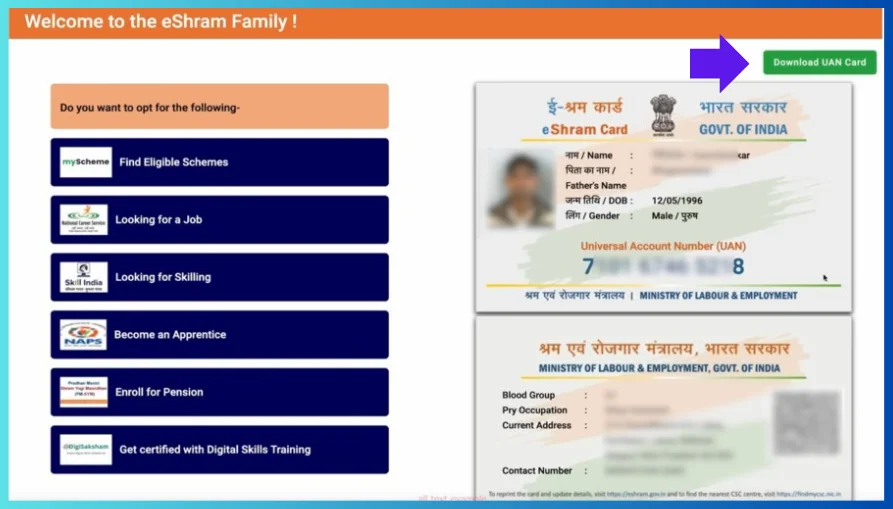
Step 6: Download e-Shram Card PDF
On the dashboard, you will see the option "Download Your E Shram Card PDF". Click on it and download your e-Shram card.
💰 eShram Card Balance / Payment Status Check Online
Under the e-Shram Card scheme, beneficiaries receive ₹1,000 every three months in various states. If you also have an e-Shram Card and want to know whether you have received the payment or not, you can check the e-Shram Card Payment Status online.
Step 1: Visit Official Website
Go to the authorized website for balance check: upssb.in/ (Uttar Pradesh Social Security Board).
Step 2: Home Page Opens
The home page of the authorized website will open.
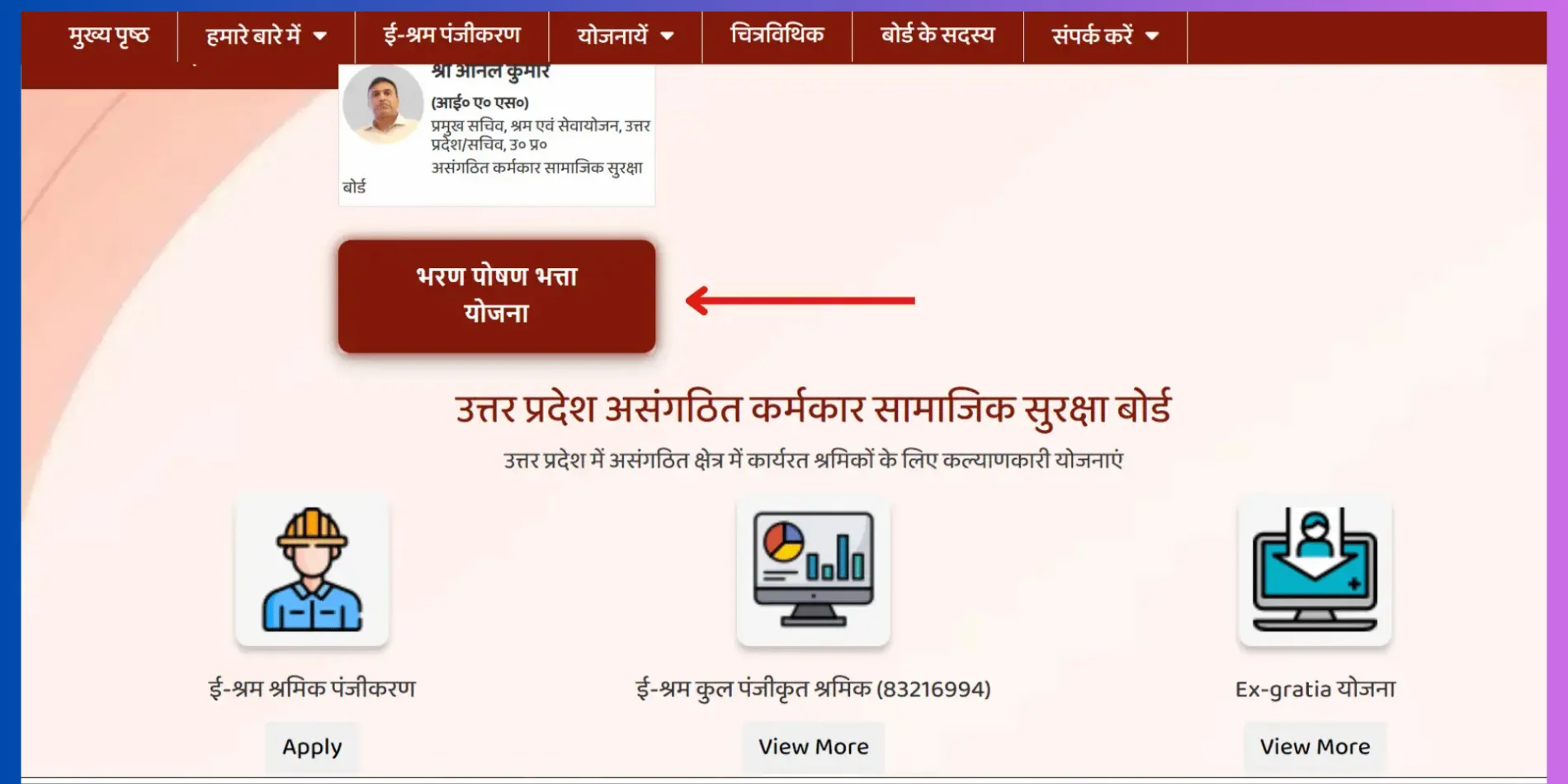
Step 3: Click on 'Bharan Poshan Bhatta Yojana'
Scroll down on this portal and click on the "Bharan Poshan Bhatta Yojana" button.
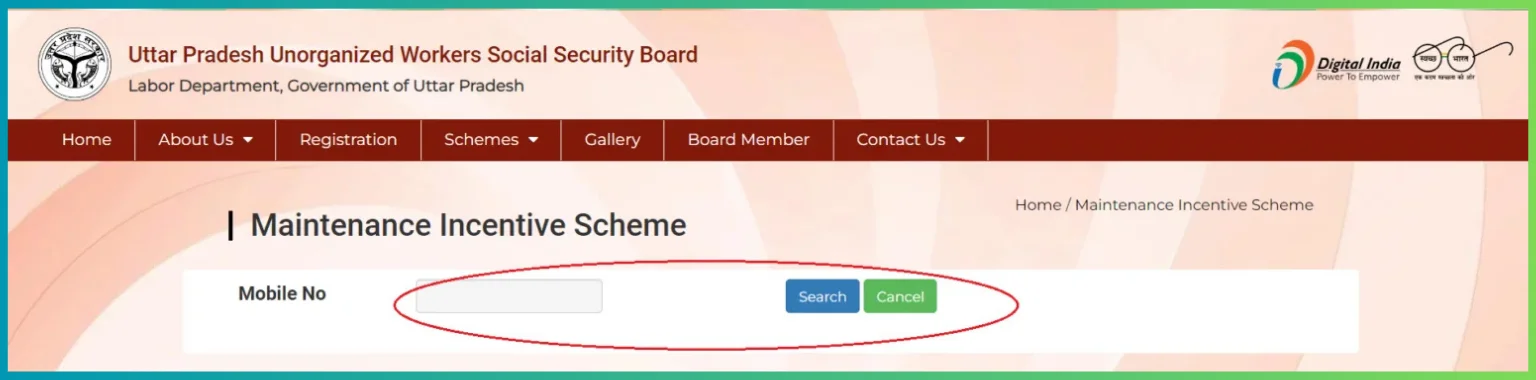
Step 4: Enter Mobile Number
Enter your mobile number and click on the "Search" button.
Step 5: View Payment Status
All your payment status will appear on your screen. Here you will be able to see whether you have received the money or not.

💡 Alternative Method: Check Balance by Phone
If you want to check your e-Shram Card balance from your mobile phone, you can dial 14434 from your registered mobile number to know your payment status.
How to Login to e-Shram Portal?
Step 1: Go to Login Page
Visit eshram.gov.in and click on "Login".
Step 2: Select Login Type
Login using either UAN + Password or Aadhaar + OTP.
Step 3: Enter Credentials
Enter your UAN and password (first-time password is UAN@DOB in DDMMYYYY format) or enter Aadhaar number.
Step 4: OTP Verification
Enter OTP received on your registered mobile number and click login.
How to Update Information in e-Shram Card?
Step 1: Login to Portal
Login to e-Shram portal using UAN and password.
Step 2: Click on Update Profile
Go to "Update Profile" or "Edit Details" option.
Step 3: Make Changes
Update your mobile number, address, occupation, bank account details, etc.
Step 4: Submit and Verify
Submit the form and verify using OTP. Changes will be saved and updated card can be downloaded.
Benefits of e-Shram Card
Accidental Insurance Cover Details
| Coverage Type | Amount | Details |
|---|---|---|
| Accidental Death | Rs. 2,00,000/- | Full cover for accidental death |
| Permanent Total Disability | Rs. 2,00,000/- | Full cover for permanent total disability due to accident |
| Permanent Partial Disability | Rs. 1,00,000/- (max) | Cover based on percentage of disability |
| Premium Payment | Nil | Premium is paid by the Government of India |
Note
The accidental insurance cover is provided under Pradhan Mantri Suraksha Bima Yojana (PMSBY) for e-Shram cardholders. The premium is paid by the government. However, workers need to have a bank account linked to Aadhaar to claim the insurance.
e-Shram Card Helpline / Contact Details
Ministry of Labour and Employment, Government of India
| Toll-Free Helpline Number | 14434 / 1800-11-5505 |
| Email Support | helpdesk-eshram@gov.in |
| Official Website | https://eshram.gov.in/ |
| Regional Offices | Contact details available on official website |
Note
e-Shram portal is completely secure and managed by the Ministry of Labour and Employment, Government of India. Do not share your UAN, password or OTP with anyone. Never pay anyone for e-Shram card registration as it is completely free.
FAQs - e-Shram Card 2026
Question: Is e-Shram Card registration free?
Answer: Yes, e-Shram Card registration is completely free for all unorganized workers. No fee is charged for registration or card download.
Question: What is the age limit for e-Shram Card registration?
Answer: Workers between the age of 16 to 59 years are eligible for e-Shram Card registration.
Question: I forgot my e-Shram login password. What should I do?
Answer: Click on "Forgot Password" on the login page. Enter your UAN or Aadhaar number. OTP will be sent to your registered mobile number. Set a new password and login.
Question: How can I check my e-Shram Card payment balance?
Answer: You can visit upssb.in, click on "Bharan Poshan Bhatta Yojana", enter your mobile number and search. You can also dial 14434 from your registered mobile number.
Question: How can I get a physical copy of e-Shram card?
Answer: After downloading the e-Shram card PDF from the portal, you can take a printout. There is no separate physical card sent by post.