
PAN Card (Permanent Account Number) is a 10-digit unique alphanumeric identification card issued by the Income Tax Department of India. This card is essential for tax payments, banking, investments, property purchases, and financial transactions. Each PAN holder is assigned a unique PAN number.
If you want to apply for a PAN Card for the first time or make corrections to your existing PAN Card, you can apply online. Here we will provide you complete information about PAN Card online application, PAN Card download, status check, address update, eligibility, required documents, and benefits.
Table of Contents
- What is PAN Card?
- Eligibility Criteria
- Required Documents
- PAN Card Online Application Process
- How to Download e-PAN Card?
- How to Check PAN Card Status?
- How to Update / Correct PAN Card?
- How to Reprint PAN Card (Download Again)?
- PAN Card Application Fee
- Benefits of PAN Card
- Helpline / Contact Details
- Frequently Asked Questions
What is PAN Card?
Meaning of PAN Card
PAN Card (Permanent Account Number) is a 10-digit unique alphanumeric identification card issued by the Income Tax Department of India. This card is used to track financial transactions with the Income Tax Department. Each PAN holder is assigned a unique PAN number.
Structure of PAN Card
PAN Card consists of a 10-digit alphanumeric code. The first 5 characters are letters, followed by 4 numbers, and the last character is a letter. This code is valid for a lifetime, and only one PAN is issued per lifetime.
Important Points
- PAN Card is valid throughout India
- Each person can have only one PAN
- PAN Card is valid for a lifetime
- PAN is mandatory for filing Income Tax Returns
Eligibility Criteria for PAN Card
Who can apply for PAN Card?
- Indian Citizens (Individuals)
- Hindu Undivided Family (HUF)
- Companies and Corporations
- Firms, LLPs and other business entities
- Trusts, Societies and NGOs
- Foreign Citizens (who do business in India)
- Any person who is a taxpayer
Note
There is no minimum age limit for PAN Card. Any person, even a minor, can get a PAN Card. Parents or guardians can apply on behalf of a minor.
Required Documents for PAN Card
| Document Type | Acceptable Documents |
|---|---|
| Identity Proof | Aadhaar Card |
| Voter ID Card | |
| Passport | |
| Driving License | |
| Address Proof | Aadhaar Card |
| Bank Statement | |
| Electricity/Water/Telephone Bill | |
| Ration Card | |
| Date of Birth Proof | Birth Certificate |
| 10th Mark Sheet | |
| Photo | Passport size color photo |
Important Note
All documents must be self-attested. Scanned copies of the documents need to be uploaded along with the application.
PAN Card Online Application Process
Follow the steps below to apply for PAN Card online:
Step 1: Go to NSDL or UTITSL Portal
First, go to the official website of NSDL (https://proteantech.in/paam/) or UTITSL.
NSDL PAN Card Application Portal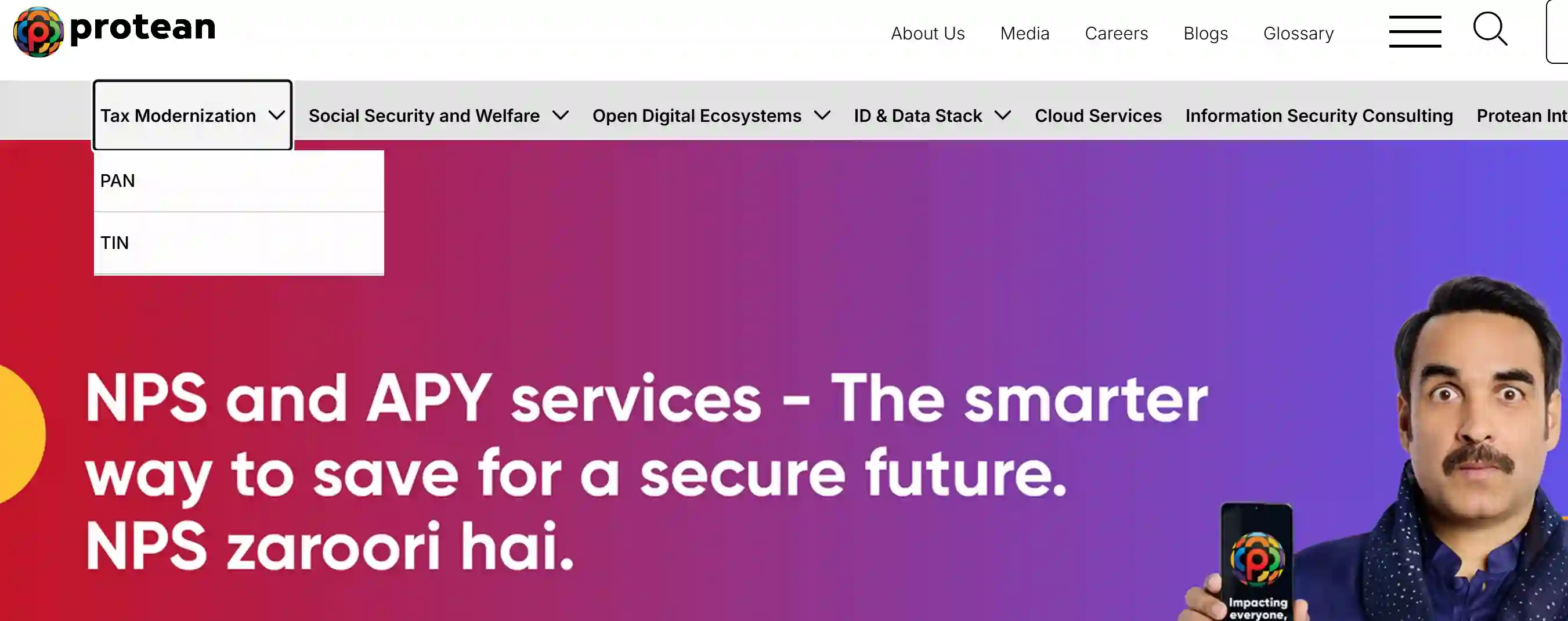
Step 2: Click on PAN Card Apply
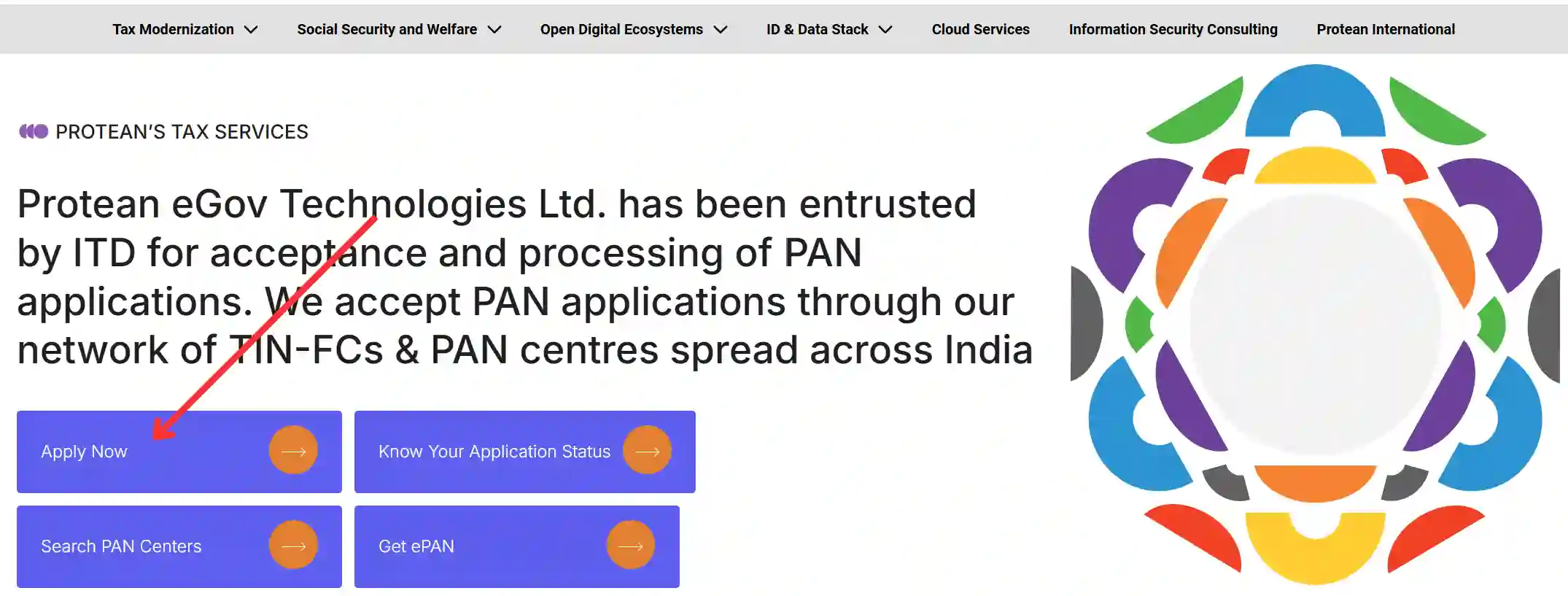
Click on PAN Card in the Tax Modernization menu on the home page, and then click on the PAN Card Apply button.
Step 3: Select Application Type
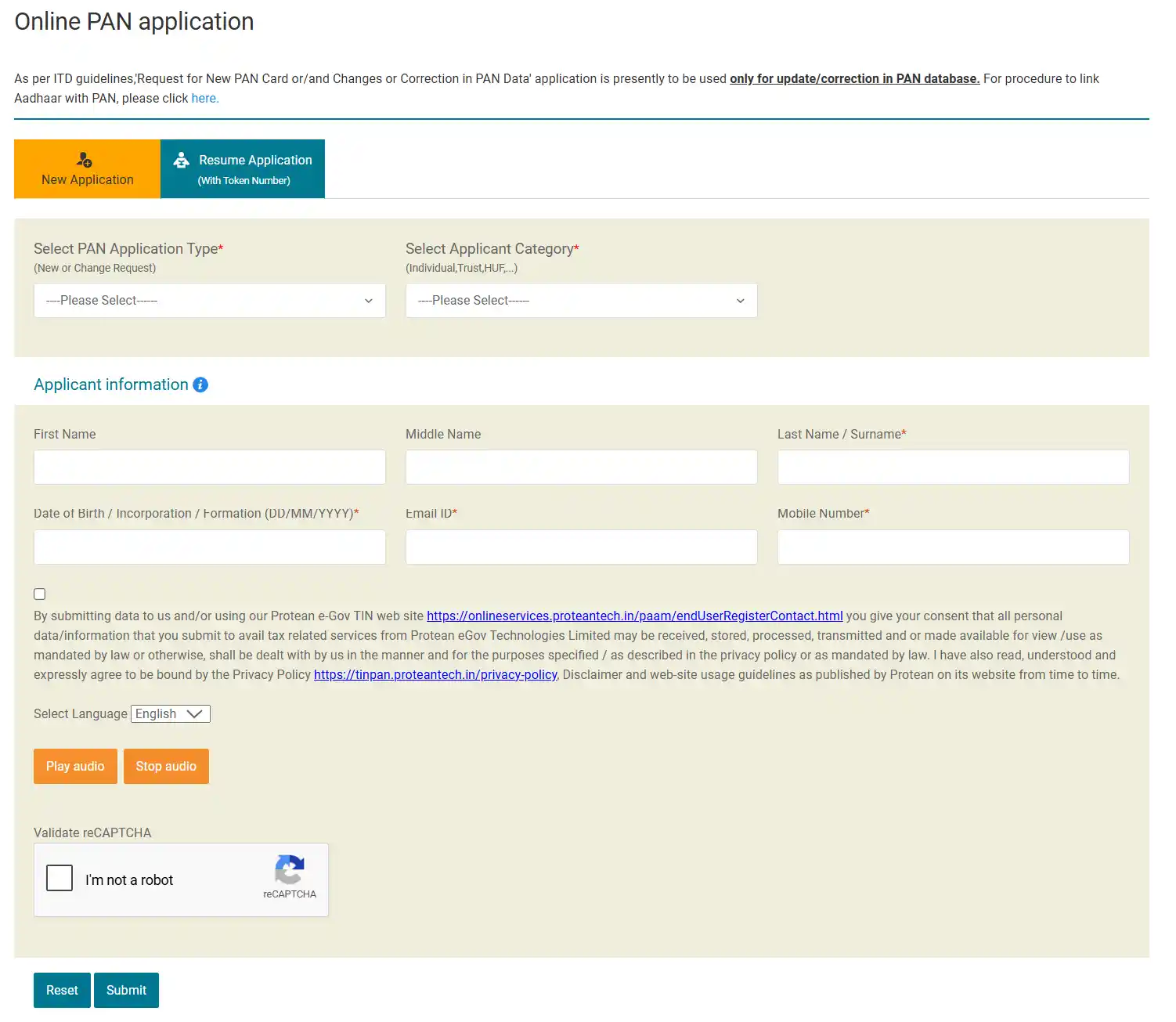
Choose "New PAN Card Application" or "Changes or Correction in PAN Card". Then select Application Type (Indian Citizen / Foreign Citizen).
Step 4: Fill Form 49A
- Full name (as per documents)
- Date of Birth (DD/MM/YYYY)
- Mother's and Father's name
- Address details (current and permanent)
- Mobile number and Email ID
Step 5: Upload Documents
Upload scanned copies of identity proof, address proof, and date of birth proof. Also, upload a passport-size photo.
Step 6: Pay the Fee
Pay the PAN Card application fee online (Credit Card, Debit Card, Net Banking, UPI).
Step 7: Submit Application
After filling in all details and paying the fee, click on "Submit". You will receive an application number (Acknowledgment Number).
Points to Note
- All information in the application must be correct and accurate
- Scanned copies of documents should be clear
- Keep the Acknowledgment Number safe
- PAN Card is delivered to your address by post within 15-20 days
How to Download e-PAN Card?
If you have applied for a PAN Card online and the PAN Card has been issued, you can download the e-PAN Card online:
Step 1: Go to Income Tax e-PAN Portal
Go to the Income Tax Department's e-PAN portal at https://www.incometax.gov.in/.
e-PAN Card Download Portal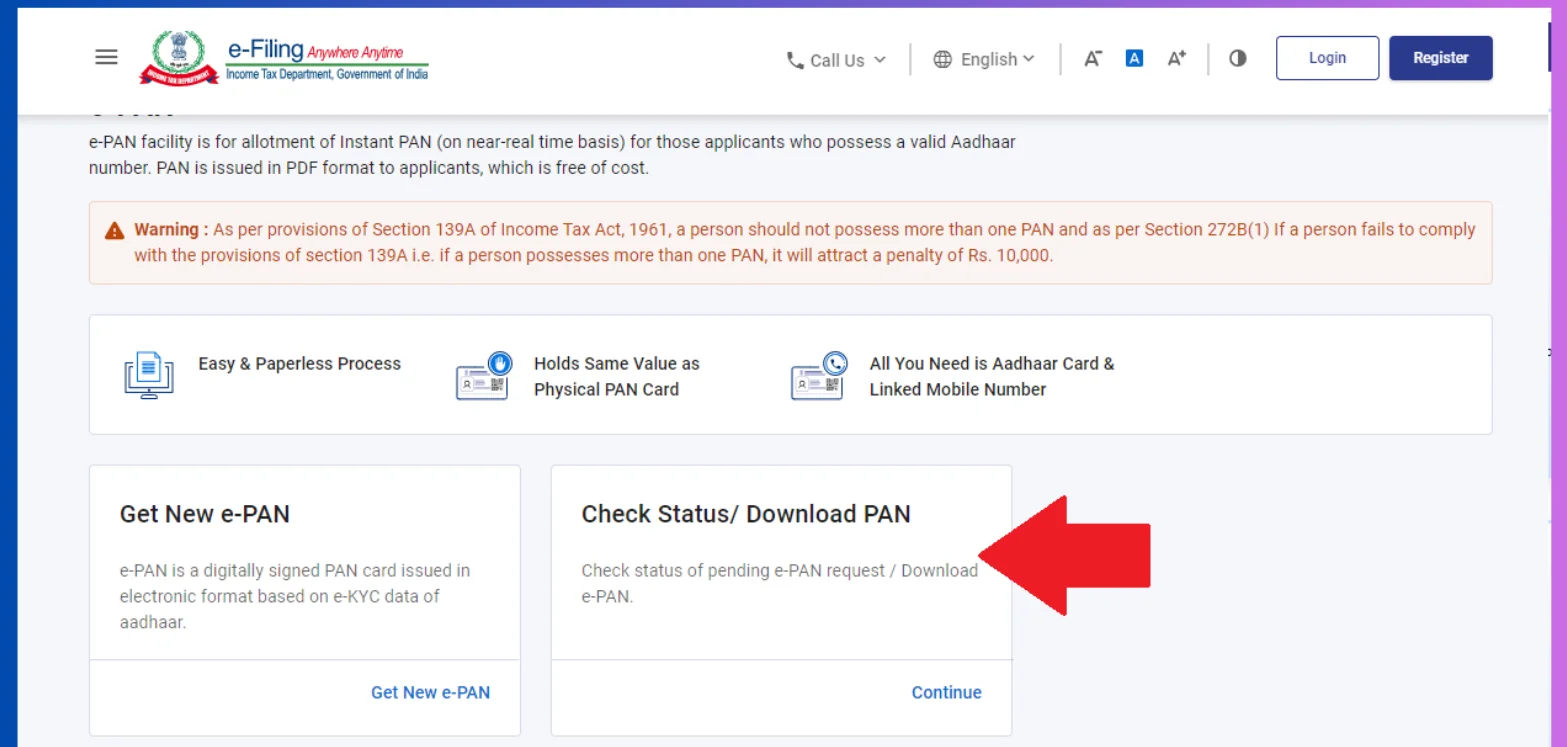
Step 2: Enter Aadhaar Number
Click on the "Download e-PAN Card" option and enter your Aadhaar number.
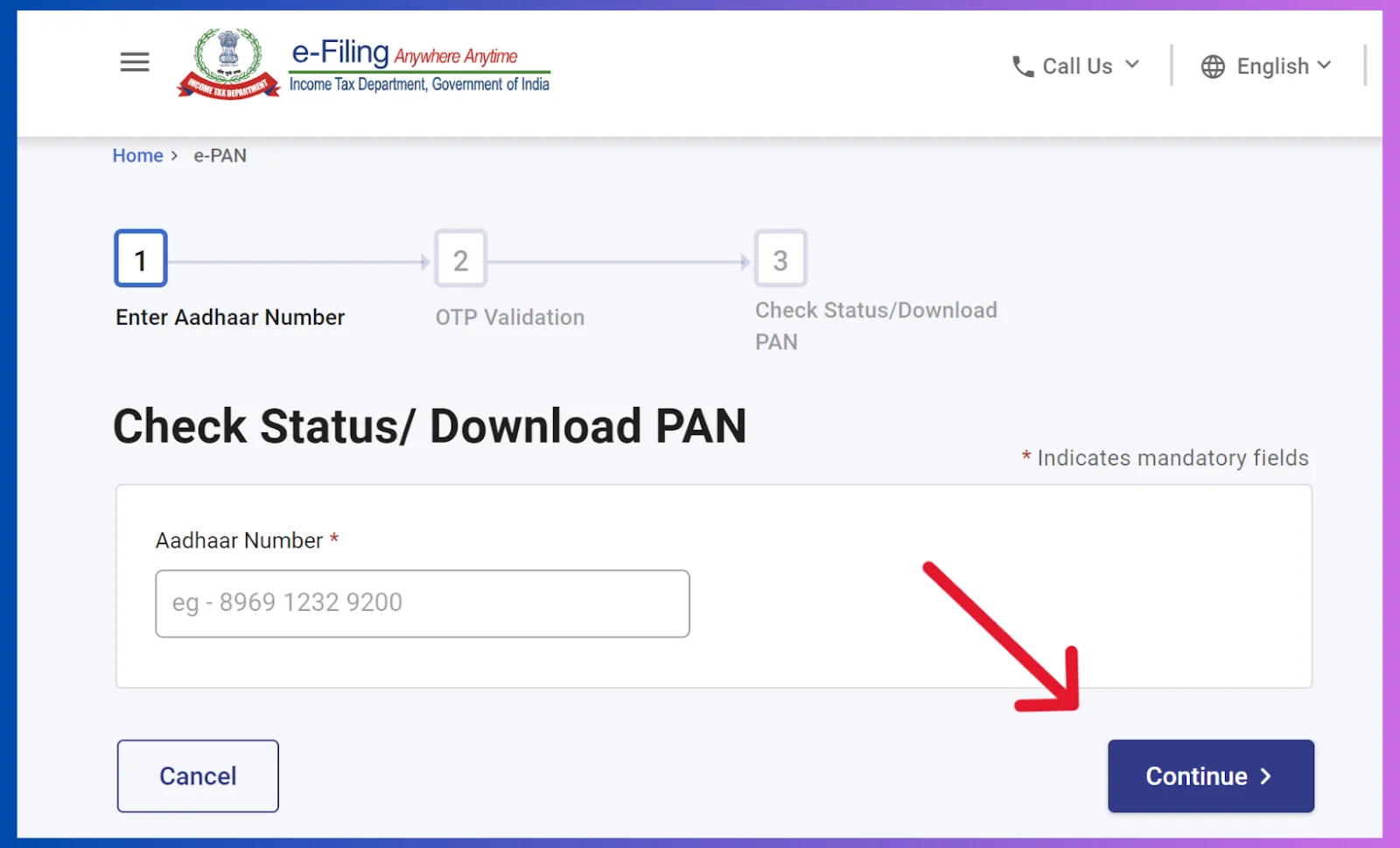
Step 3: Verify OTP
An OTP will be sent to your Aadhaar-linked mobile number. Enter that OTP to verify.
Step 4: Download PAN Card
After verification, your e-PAN Card will open in PDF format. You can download it and take a printout.
Features of e-PAN Card
- e-PAN Card is issued by the Income Tax Department
- It is equally valid as the physical PAN Card
- e-PAN Card can be downloaded online anytime
How to Check PAN Card Status?
Step 1: Go to NSDL or UTITSL Portal
First, go to the official website of NSDL (https://proteantech.in/paam/) or UTITSL.
NSDL PAN Card Application PortalStep 2: Click on PAN Card
Click on PAN Card in the Tax Modernization menu on the home page, and then you will see the PAN Card Status option.
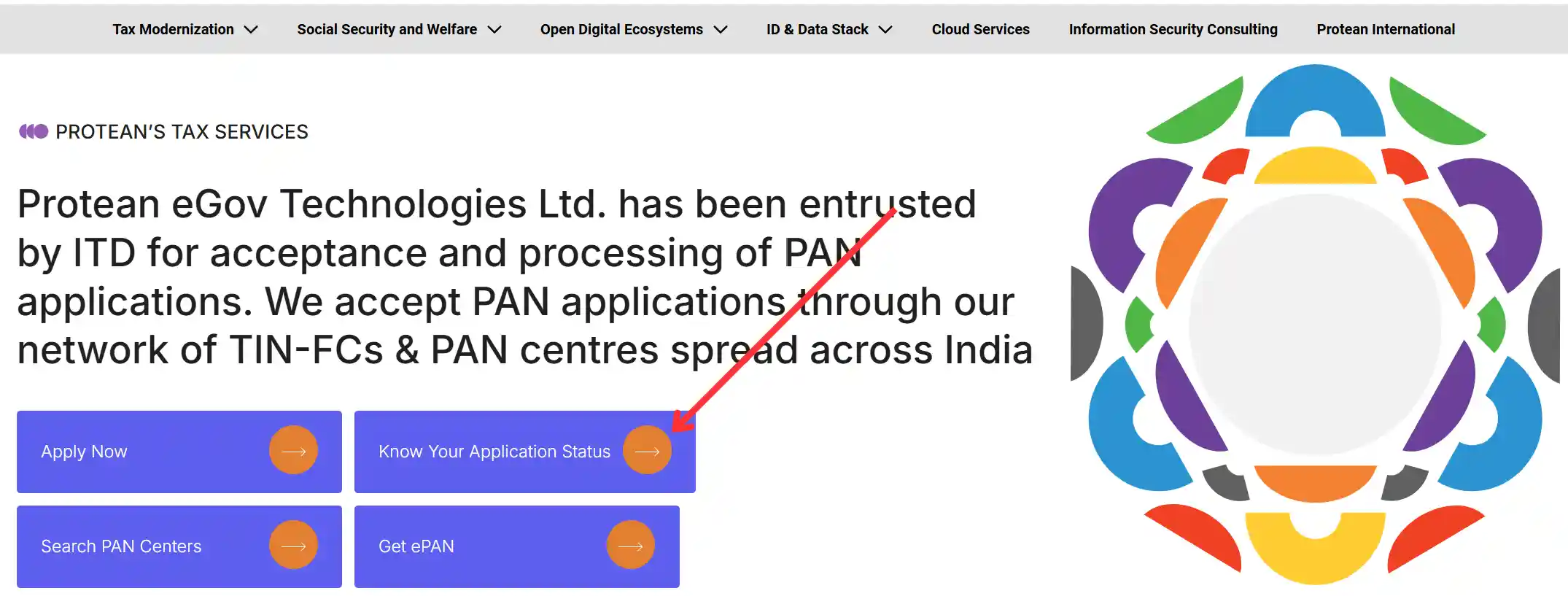
Step 3: Go to NSDL Status Page
Go to the NSDL PAN Card Status page at https://tin.tin.proteantech.in/pantan/StatusTrack.html.
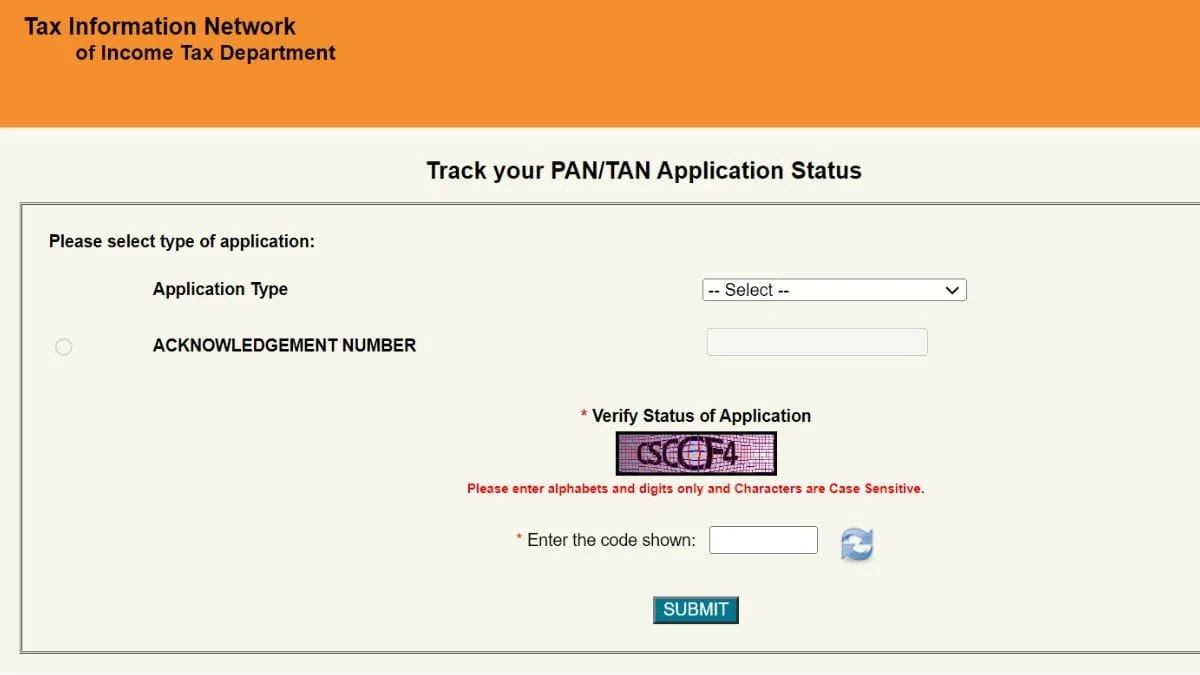
Step 4: Select Application Type
Select the Application Type (PAN New - Form 49A or PAN Change - Form 49A).
Step 5: Enter Application Number
Enter the Acknowledgment Number received at the time of application.
Step 6: View Status
Enter the requested information, click on the "Submit" button, and then the current status of your PAN Card application will appear.
How to Update / Correct PAN Card?
If there is any mistake in your PAN Card or you want to update your address, name, mobile number, etc., you can make corrections online:
Step 1: Go to NSDL
First, go to the NSDL PAN Card Correction Portal.
Step 2: Select 'Changes or Correction'
Choose the "Changes or Correction in PAN Card" option and enter your PAN number.
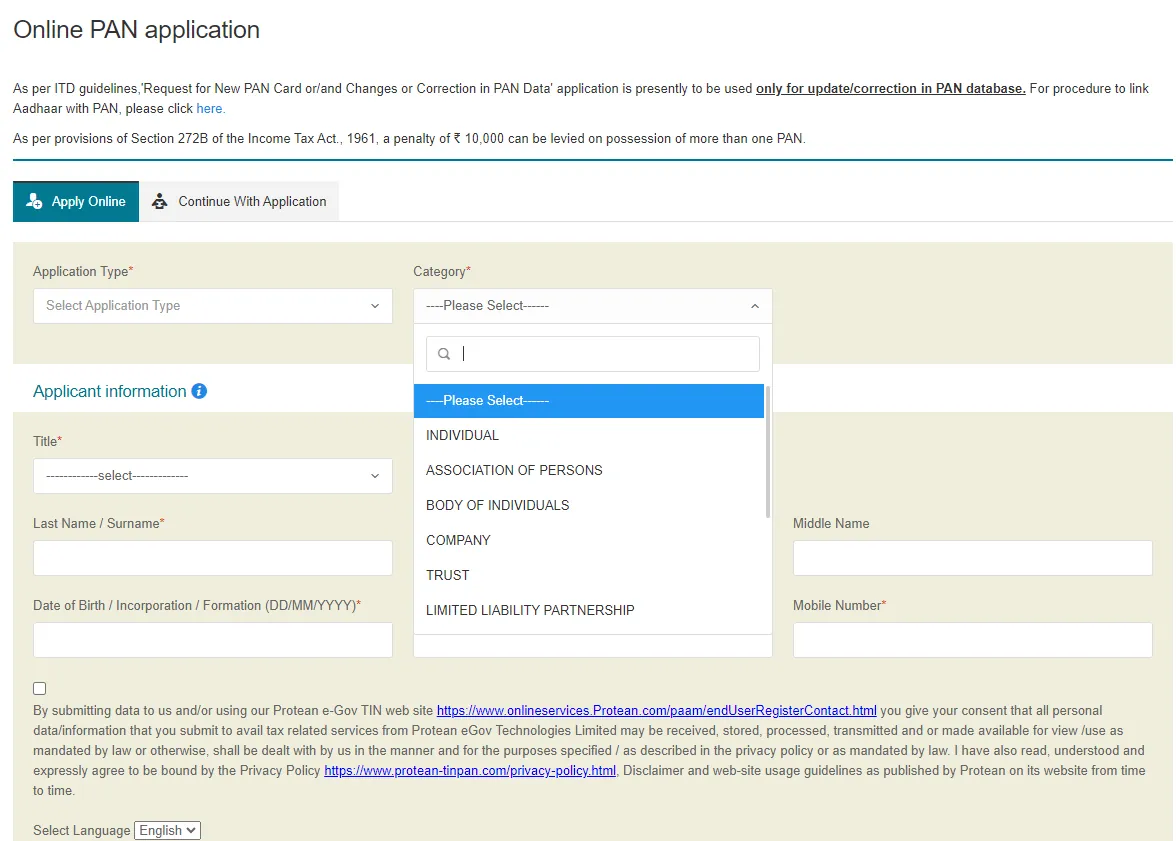
Step 3: Update Information
Enter the information you want to correct (e.g., name, address, date of birth, mother's/father's name, etc.).
Step 4: Upload Documents
Upload the necessary documents to support the correction.
Step 5: Pay Fee and Submit
After this, pay the fee and submit the application. After correction, a new PAN Card will be sent to your address.
Note
Documentary proof is required for correction of name, date of birth, or parents' names. For address change, the latest address proof must be uploaded.
How to Reprint PAN Card?
Step 1: Go to NSDL Utility Page
To reprint your PAN card, first go to the NSDL PAN Card Reprint page.
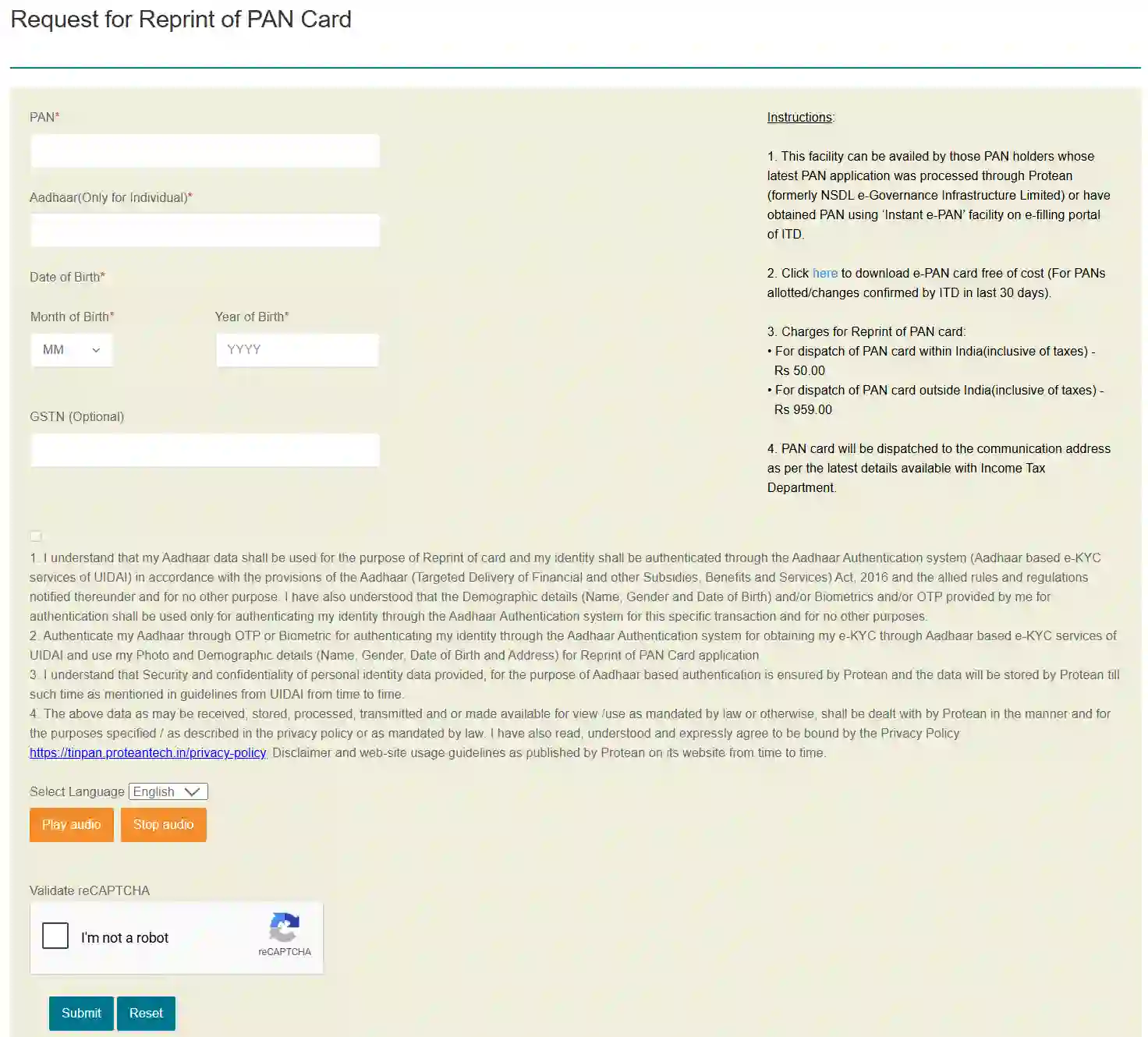
Step 2: Enter PAN Number
Enter your PAN number and verify your date of birth.
Step 3: Pay the Fee
Pay the reprint fee online.
Step 4: Download PAN Card
After payment, you can download the PAN Card PDF and take a printout.
PAN Card Application Fee
| Type of Application | Indian Citizens (including GST) | Foreign Citizens |
|---|---|---|
| New PAN Card Application | Rs. 107 (including GST) | Approx. Rs. 1,020 |
| PAN Card Correction | Rs. 107 (including GST) | Approx. Rs. 1,020 |
| PAN Card Reprint | Rs. 60 (including GST) | Approx. Rs. 1,020 |
| e-PAN Card Download | Free of Cost | |
Payment Methods
- Credit Card / Debit Card
- Net Banking
- UPI (Google Pay, PhonePe, Paytm)
- e-Challan (payment at bank branch via e-Challan)
Benefits of PAN Card
PAN Card Helpline / Contact Details
NSDL (PAN Card Application Assistance)
| Toll-Free Helpline Number | 1800-120-6299 / 1800-270-0839 |
| Email Support | pan@nsdl.co.in |
| Official Website | https://www.tin-nsdl.com/ |
| UTITSL Helpline | 1800-300-20343 |
| e-PAN Helpline | 1800-103-0025 / 1800-419-8647 |
Important
Do not contact any intermediary for making a PAN Card or making corrections. Apply directly through the official website of NSDL or UTITSL. All services related to PAN Card are available online.
Frequently Asked Questions (FAQs)
Question 1: What is PAN Card?
Answer: PAN Card (Permanent Account Number) is a 10-digit unique alphanumeric identification card issued by the Income Tax Department of India.
Question 2: How to apply for PAN Card online?
Answer: Visit the official website of NSDL or UTITSL, fill Form 49A, upload documents, pay the fee and submit the application.
Question 3: How to download PAN Card?
Answer: For e-PAN Card, visit incometax.gov.in, enter your Aadhaar number, verify OTP and download the PDF.
Question 4: How to make corrections in PAN Card?
Answer: On the NSDL portal, choose the 'Changes or Correction in PAN Card' option, enter your PAN number, update the information and upload documents.
Question 5: How long does it take to get a PAN Card?
Answer: A PAN Card is usually delivered to your address by post within 15-20 days. The e-PAN Card can be downloaded immediately.
Question 6: Can a PAN Card be made without an Aadhaar Card?
Answer: Yes, a PAN Card can be made without an Aadhaar Card. For this, a Voter ID, Passport or other documents can be used.
Question 7: What is the PAN Card application fee?
Answer: The application fee for a new PAN Card for Indian citizens is Rs. 107 (including GST).