
The Mahatma Gandhi National Rural Employment Guarantee Act (MGNREGA) is a historic law enacted by the Government of India. This act guarantees employment to people living in rural areas. Its main objective is to provide livelihood security to rural families.
NREGA was implemented in 2005 and is the world's largest employment guarantee program. Under this scheme, every rural family is guaranteed 100 days of employment per financial year.
Table of Contents
- What is NREGA?
- Objectives of NREGA
- Benefits of NREGA
- Eligibility Criteria
- Required Documents
- Online Job Card Application
- View Job Card List
- Job Card Status Check
- Download Job Card
- How to View NREGA Muster Roll
- View NREGA MIS Report
- Check NREGA Attendance
- Request for Work
- Payment Process
- Women Participation
- Online Services
- Grievance Redressal
- Contact Details
- Frequently Asked Questions
What is NREGA?
Meaning of NREGA
The Mahatma Gandhi National Rural Employment Guarantee Act (MGNREGA) is a major scheme of the Government of India implemented in 2005. This act guarantees employment to people living in rural areas. Its main objective is to provide livelihood security to rural families.
History of NREGA
NREGA was first implemented in 2005 as the National Rural Employment Guarantee Act. Later in 2009, its name was changed to Mahatma Gandhi National Rural Employment Guarantee Act (MGNREGA). It is the world's largest employment guarantee program.
Important Points
- NREGA guarantees 100 days of employment every year to rural families
- Wages are paid directly into workers' bank accounts
- Women's participation is encouraged in this scheme
- Basic facilities are provided at the workplace
Objectives of NREGA
Benefits of NREGA
Employment Guarantee Benefit
Every rural family is guaranteed 100 days of employment in a financial year
Minimum Wages Benefit
Payment of minimum wages fixed by the state government
Women Participation Benefit
One-third of employment reserved for women
Direct Payment Benefit
Wages are paid directly into workers' bank accounts
Workplace Facilities Benefit
Facilities of drinking water, first aid and shade at the workplace
Unemployment Allowance Benefit
Unemployment allowance if employment is not provided within 15 days
Additional Benefits
- Development of infrastructure in rural areas
- Strengthening the rural economy
- Relief from seasonal unemployment
- Reduction in rural-urban migration
- Expansion of social security
Eligibility Criteria for NREGA
Main Eligibility Conditions
- Applicant must be a citizen of India
- Applicant must be a resident of a rural area
- Applicant must be 18 years of age or older
- Adult members of the family must be willing to work for wages
- Family must have a Job Card
Important Note
To demand employment under NREGA, the family must have a Job Card. The Job Card is issued by the Gram Panchayat and contains details of the family members.
| Category | Eligibility | Note |
|---|---|---|
| Age | 18 years or more | No upper age limit |
| Residence | Rural area | Urban residents are not eligible |
| Family Members | Adult members | Maximum 100 days of employment per family |
| Documents | Job Card | Issued by Gram Panchayat |
Required Documents for Job Card
Required Documents
- Aadhaar Card
- Ration Card
- Residence Certificate
- Bank Account Details
- Passport Size Photos (2-4)
- Age Proof Certificate
NREGA Job Card Online Application
Step 1: Download UMANG App
To apply for your NREGA job card online through UMANG App, you need to download the UMANG application from the Play Store or visit its official portal https://web.umang.gov.in/.
Visit UMANG Portal
Step 2: Login/Register
On the home page of the application, click on the "Login/Register" button on the right side. Then a new page will open where you will see the "Register Here" option below the login button. After registration, you can log in to this portal using your mobile number and OTP.

Step 3: Search for MGNREGA Service
After this, you will reach the home page of the UMANG app portal. Then type MGNREGA in the search bar at the top and search. Then the MGNREGA Services option will open in front of you, then click on NREGA.

Step 4: Apply for Job Card
As soon as you click on it, the MGNREGA Service Portal page will open. On this page you will see many options like Apply for Job Card, Download Job Card, Track Job Card Status. Now click on the Apply for Job Card option.

Step 5: Fill Details and Apply
After this, you can apply for a job card by filling in all your General Details and Applicant Details. After filling in all the information correctly, submit the application.
Points to Note
- The application form is available free of cost, do not pay anyone
- The Job Card should be received within 15 days of submitting the application
- If you do not receive a Job Card, complain to higher authorities
- Get corrections made immediately if there are errors in the Job Card
How to View NREGA Job Card List?
Step 1: Go to Official Website
For NREGA Job Card List, first go to the official website of NREGA https://nrega.nic.in/.
Visit Job Card List PortalStep 2: Go to Reports Section
In the menu on the homepage, click on Key Features, then from the drop-down menu, click on the Reports (State) option.

Step 3: Select Panchayat Level
Then you will come to a new page. In the menu of that page, click on Panchayats GP/PS/ZP. Then a new page will open, where you will see 3 options:
- Gram Panchayats
- Panchayat Samiti/Block Panchayat/Mandal
- Zilla Panchayats
Step 4: Select Gram Panchayat
After clicking on the Gram Panchayats option, a new page will open. Then click on the Generate Reports option.

Step 5: Select State and District
After this, the list of all states will open. You have to select your state. Then after selecting the state, you will get the option to enter the following information: State Name, Financial Year, District, Block, Panchayat Name.

Step 6: View Job Card Register
After filling in all the above information, click on the Proceed button below. After clicking, the Gram Panchayat Reports page will open, in which you will see 6 options. If you only want to check the job card list, you need to click on the 4th option "Job card/Employment Register" under the R1. Job Card / Registration option.
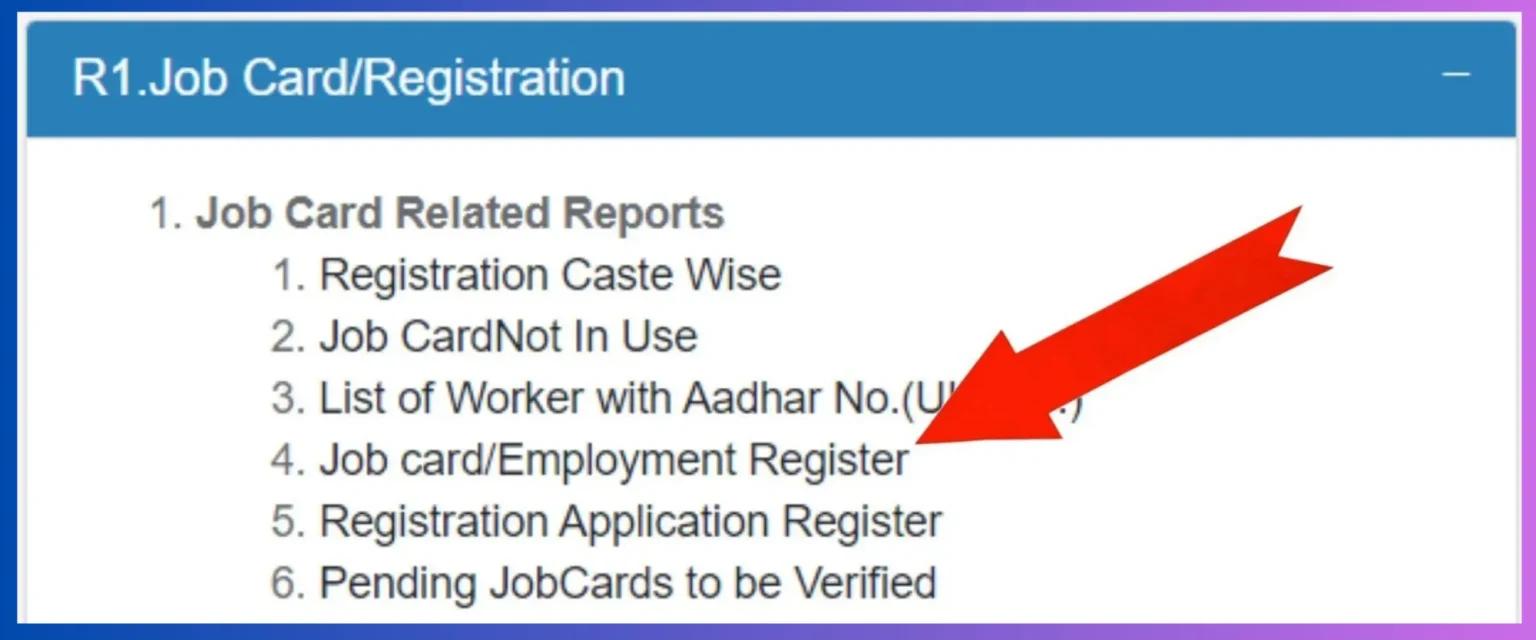
Step 7: View Job Card List
After this, the NREGA Employment Register will open, where you can check your name in the job card list.

Meaning of Colors in Job Card List
The names of beneficiaries may be entered in different colors in the job card list:
Job Card List Example
| S.No. | Job Card Number | Head of Family Name | Address | Status |
|---|---|---|---|---|
| 1 | MP/01/2023/001 | Ram Singh | Village - Sujanpur, District - Indore | Active |
| 2 | MP/01/2023/002 | Sita Devi | Village - Sujanpur, District - Indore | Active |
| 3 | MP/01/2023/003 | Mohan Lal | Village - Sujanpur, District - Indore | Inactive |
| 4 | MP/01/2023/004 | Geeta Bai | Village - Sujanpur, District - Indore | Incomplete |
| 5 | MP/01/2023/005 | Rajesh Kumar | Village - Sujanpur, District - Indore | Warning |
Important Suggestions
- If you do not find your name in the job card list, contact the Gram Panchayat office
- Get corrections made immediately if there are any errors in the job card
- The job card list keeps getting updated regularly
- If you are unable to view the online list, contact the Gram Panchayat office
How to View NREGA Muster Roll?
What is Muster Roll?
Muster Roll is an important document of NREGA which contains details of workers' daily attendance, working hours and wages. It is publicly available to ensure transparency.
Step 1: Go to Official Website
To view NREGA Muster Roll, first go to the official website https://nrega.nic.in/. Go to the Reports section on the homepage.
Visit Muster Roll PortalStep 2: Select Muster Roll Report
In the Reports section, you will see the "Muster Rolls" option. Click on it. Then you will need to select your state, district, block and gram panchayat.
Step 3: Select Work Site
After this, you will have to select the work site for which you want to see the Muster Roll. Click on the name of the work site.
Step 4: View Muster Roll
After selecting the work site, the Muster Roll will open in front of you. Here you can see the names of workers, working days, attendance and wage details.

Step 5: Download Details
If you want to download the Muster Roll, click on the download button provided on the page. You can save it in PDF format.
What information is in the Muster Roll?
- Worker's name and job card number
- Work site name and code
- Date of work
- Days of attendance
- Working hours
- Wage rate
- Total wages
- Payment status
How to View NREGA MIS Report
Step 1: Go to NREGA MIS Portal
To view NREGA MIS Report, first go to the NREGA MIS portal https://nrega.nic.in/netnrega/home.aspx. Here you will find various types of reports.
Visit NREGA MIS Portal
Step 2: Select Report Type
On the MIS portal, you will find options for various types of reports such as Job Card Report, Employment Report, Payment Report, Work Progress Report etc. Choose the report according to your requirement.
Step 3: Select Area
After this, you will need to select the state, district, block and gram panchayat. You can view reports at national, state, district or gram panchayat level.
Step 4: Select Time Period
Now you will need to select the time period for the report. You can view monthly, quarterly or annual reports. You can also select the financial year.

Step 5: Generate Report
After filling in all the information, click on the "Generate Report" button. After the report is generated, you can view it and also download it.
Types of MIS Reports
- Job Card Register
- Employment Register
- Payment Register
- Work Progress Report
- Wage Report
- Women Participation Report
- Grievance Redressal Report
MIS Report Example
| Report Type | Description | Utility |
|---|---|---|
| Job Card Register | List of job card holders in the gram panchayat | Information of eligible beneficiaries |
| Employment Register | Details of workers provided employment at the work site | Checking the amount of employment provided |
| Payment Register | Details of wages paid to workers | Ensuring transparency of payments |
| Work Progress Report | Details of progress of various works | Monitoring progress of works |
How to Check NREGA Attendance
Step 1: Go to UMANG App or Website
For NREGA Attendance Check, download the UMANG app or go to https://web.umang.gov.in/. After logging in, search for the MGNREGA service.
Visit UMANG PortalStep 2: Select Attendance Check Option
On the MGNREGA Service Portal, you will see the "Attendance Check" option. Click on it.
Step 3: Enter Job Card Number
After this, you will need to enter your Job Card Number. In some cases, you may also need to enter your Aadhaar number or mobile number.
Step 4: Select Time Period
Now you can select the time period for attendance check. You can select a specific month or date range.
Step 5: View Attendance Details
After entering all the information, click on the "Submit" or "Check" button. Your detailed attendance information will appear on the screen.

What information is available in attendance check?
- Work site name and code
- Date of work
- Days of attendance
- Working hours
- Wage rate
- Total wages
- Payment status
- Payment date
Important Suggestions
- Get your attendance recorded at the workplace daily
- Be sure to sign the attendance register
- If there is any error in attendance, get it corrected immediately
- Keep checking the attendance details regularly
- Confirm the attendance details before payment
NREGA Job Card Status Check
Step 1: Login to UMANG App
To track your NREGA job card status through UMANG App, you need to download the UMANG application from the Play Store or go to https://web.umang.gov.in/. After logging in, search for the MGNREGA service.
https://web.umang.gov.in/Step 2: Select Track Job Card Status
On the MGNREGA Service Portal page, you will see the Track Job Card Status option. If you want to track your job card status, click on "Track Job Card Status".

Step 3: Enter Reference Number
Then a new page will open, in which you have to enter the "Reference Number" and click on "Track" below. After this, information related to "Track Job Card Status" will appear.

NREGA Job Card Download
Step 1: Login to UMANG App
To download your NREGA job card through UMANG App, you need to download the UMANG application from the Play Store or go to https://web.umang.gov.in/. After logging in, search for the MGNREGA service.
https://web.umang.gov.in/Step 2: Select Download Job Card
On the MGNREGA Service Portal page, you will see the Download Job Card option. Click on the Download Job Card button.

Step 3: Select Download Method
Then a page will open where you have to click on "Download Using" and then click on Reference Number or Job Card Number. Then, according to your convenience, after entering the number, click on the "Download" button below.
Step 4: Download Job Card
This way you can download your job card. And you can also print it when needed.
How to Demand Work Under NREGA?
Step 1: Submit Written Application
To demand work under NREGA, submit a written application at the Gram Panchayat office. In the application, mention the date of starting work and the number of family members.
Step 2: Take Receipt of Application
After submitting the application, be sure to take a receipt from the Gram Panchayat office. The receipt should have the date and serial number of the application.
Step 3: Work Allocation
Within 15 days of receiving the application, the Gram Panchayat will allot work to you. If work is not allotted within 15 days, you will receive an unemployment allowance.
Step 4: Start Work
After work is allotted, start work on the specified date and place. Carry your Job Card and Aadhaar Card to the workplace.
Step 5: Get Attendance Recorded
Get your attendance recorded at the workplace daily. Sign the attendance register and check the wage details.
Important Information
- A Job Card is mandatory to demand work
- Work should be allocated within 15 days of receiving the application
- If work is not allocated, you will receive an unemployment allowance
- The workplace should be within 5 km of the house
- Travel allowance will be provided for distances greater than 5 km
NREGA Wage Payment Process
Step 1: Get Attendance Recorded
Get your attendance recorded at the workplace daily. Sign the attendance register and check the wage details.
Step 2: Wage Calculation
Wages are calculated based on working hours and the amount of work done. The minimum wage is fixed by the state government.
Step 3: Wage Payment
Wages are paid directly into workers' bank accounts. Payment should be made within 15 days.
Step 4: Payment Confirmation
After payment is made, you will receive a notification via SMS. Confirm the payment in your bank account.
Step 5: Problem Resolution
If there is any problem with the payment, complain at the Gram Panchayat office or Block office.
Important Points Regarding Payment
- Wages must be paid within 15 days
- Payment is made directly into bank accounts
- If there is a delay in payment, compensation is provided
- The wage rate is fixed by the state government
- Payment status can be tracked online
Women Participation in NREGA
Special Provisions for Women
- One-third of total employment is reserved for women
- Equal wages for women and men
- Priority to women's groups
- Measures for women's safety at the workplace
- Provision for maternity benefits
Women Empowerment
NREGA is an important means of women empowerment. Through this, women get economic self-reliance and their social status improves. Women's participation strengthens the rural economy.
NREGA Online Services
Online Job Card Status Benefit
View job card status on the official website. Search by job card number or Aadhaar number.
Wage Payment Status Benefit
View wage payment status on the website. Search by job card number or bank account number.
Request for WorkBenefit
Online work request facility is available in some states. Information about this is available on the official website.
File Complaint Benefit
File complaints online on the website. Complaint status can also be tracked online.
Benefits of Online Services
- Saving time and money
- Increased transparency
- Quick resolution of complaints
- Easy availability of information
- Checking payment status
NREGA Grievance Redressal Process
Step 1: Complain at Local Level
First, file a complaint at the Gram Panchayat office. If the problem is not resolved, go to the next level.
Step 2: Complain at Block Level
If not resolved at the Gram Panchayat level, file a complaint at the Block Development Officer's office.
Step 3: Complain at District Level
If not resolved at the block level, file a complaint at the District Collector's office.
Step 4: Complain at State Level
If not resolved at the district level, file a complaint with the state government's Rural Development Department.
Step 5: Complain at Central Level
If not resolved at the state level, file a complaint with the central government's Ministry of Rural Development.
Types of Complaints
- Not receiving Job Card
- Not receiving work
- Not receiving wages
- Reduction in wages
- Delay in payment
- Lack of facilities at the workplace
Contact Details
NREGA Helpline
| National Helpline | 1800110707 |
| nrega@nic.in | |
| Official Website | https://nrega.nic.in/ |
| UMANG Portal | https://web.umang.gov.in/ |
| Ministry of Rural Development | Government of India, New Delhi |
Important
All services under NREGA are free. No fee is required for making a job card, demanding work, or filing a complaint. If anyone asks for a fee, complain immediately.
Frequently Asked Questions (FAQs)
Question: What is the full form of NREGA?
Answer: The full form of NREGA is Mahatma Gandhi National Rural Employment Guarantee Act (MGNREGA).
Question: How many days of employment are provided under NREGA?
Answer: Under NREGA, every rural family is guaranteed 100 days of employment per financial year.
Question: How to apply for NREGA?
Answer: To apply for NREGA, you first need to get a Job Card. Apply for a Job Card at the Gram Panchayat office or apply online through the UMANG app.
Question: What is the wage rate in NREGA?
Answer: The wage rate in NREGA is determined by the state government. This rate may vary from state to state but cannot be less than the minimum wage.
Question: What to do if work is not provided?
Answer: If work is not provided within 15 days of demanding work, you will receive an unemployment allowance. For this, apply at the Gram Panchayat office.
Question: What are the special provisions for women in NREGA?
Answer: Under NREGA, one-third of total employment is reserved for women. Women and men receive equal wages for equal work.