
Labour Card (Worker Card) is an important identity card issued by the Labour Department of the State Government to workers in the unorganized sector. Under this scheme, construction workers, domestic helpers, street vendors, agricultural workers, migrant laborers, etc., are registered. Each registered worker receives a unique worker registration number.
If you are also a worker in the unorganized sector and want to get a Labour Card, you can apply online. Here we will explain the complete process of Labour Card online registration, Labour Card list check, Labour Card renewal, eligibility, required documents, and status check.
Important Points (Table of Contents)
What is a Labour Card?
Main Objective of the Scheme
The main objective of the Labour Card (Worker Card) scheme is to create a national database of workers in the unorganized sector and provide them benefits of government schemes. Under this, each registered worker receives a unique worker registration number.
Importance of Labour Card
The Labour Card provides you benefits of various welfare schemes of the state government. Through this card, you can receive financial assistance, education scholarships, health insurance, accident insurance, and other benefits.
Important Points
- Labour Card registration is completely free.
- Aadhaar card linked to mobile number is mandatory for registration.
- Each worker receives a unique worker registration number.
- Labour Card renewal is required from time to time.
Eligibility Criteria for Labour Card
Who Can Apply?
- Applicant must be an Indian citizen.
- Age should be between 18 to 60 years (may vary by state).
- Worker must be from the unorganized sector (construction, domestic work, street vending, agriculture, migrant labor, etc.).
- Worker must have a valid Aadhaar card linked to mobile number.
- Construction workers may require 90 days of work proof.
Required Documents for Labour Card
| Document Type | Description | Importance |
|---|---|---|
| Aadhaar Card | Aadhaar card must be linked to mobile number | Mandatory |
| PAN Card | PAN Card (if available) | Optional |
| Bank Account | Copy of bank passbook | Mandatory |
| Residence Proof | Ration Card / Voter ID / Electricity Bill | Mandatory |
| Worker Work Proof | 90 days work proof for construction workers | Mandatory (for construction workers) |
| Income Certificate | Income certificate (if required) | Optional |
| Passport Size Photo | Recent color photo | Mandatory |
Aadhaar Linking Mandatory
Aadhaar card linked to mobile number is mandatory for Labour Card registration. Registration is not possible without Aadhaar authentication. Make sure your mobile number is registered with Aadhaar.
Labour Card Online Registration Process
If you are a resident of Uttar Pradesh and want to apply online for a Labour Card, follow the steps below to easily apply online:
Step 1: Visit State Labour Department Website
First, go to the official website of your state's labour department, for Uttar Pradesh: upbocw.in.
UP Labour Card Official Website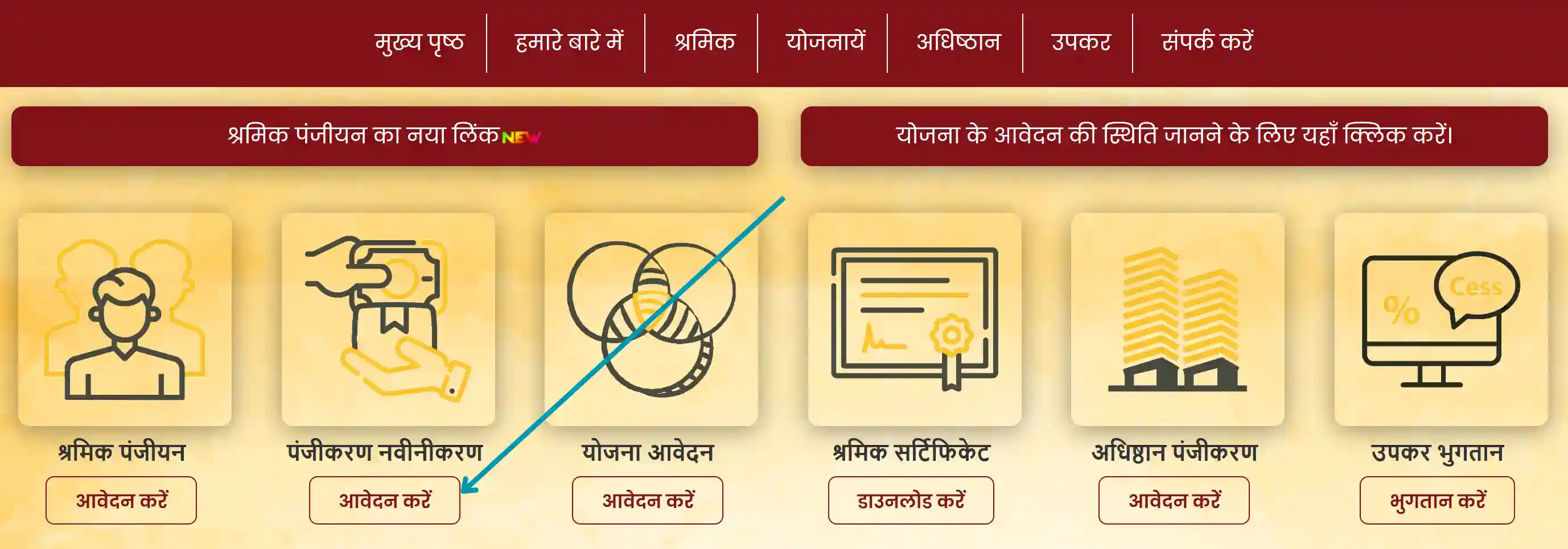
Step 2: Click on 'New Registration' or 'Apply Online'
On the homepage, click on "New Registration" or "Apply Online" button.
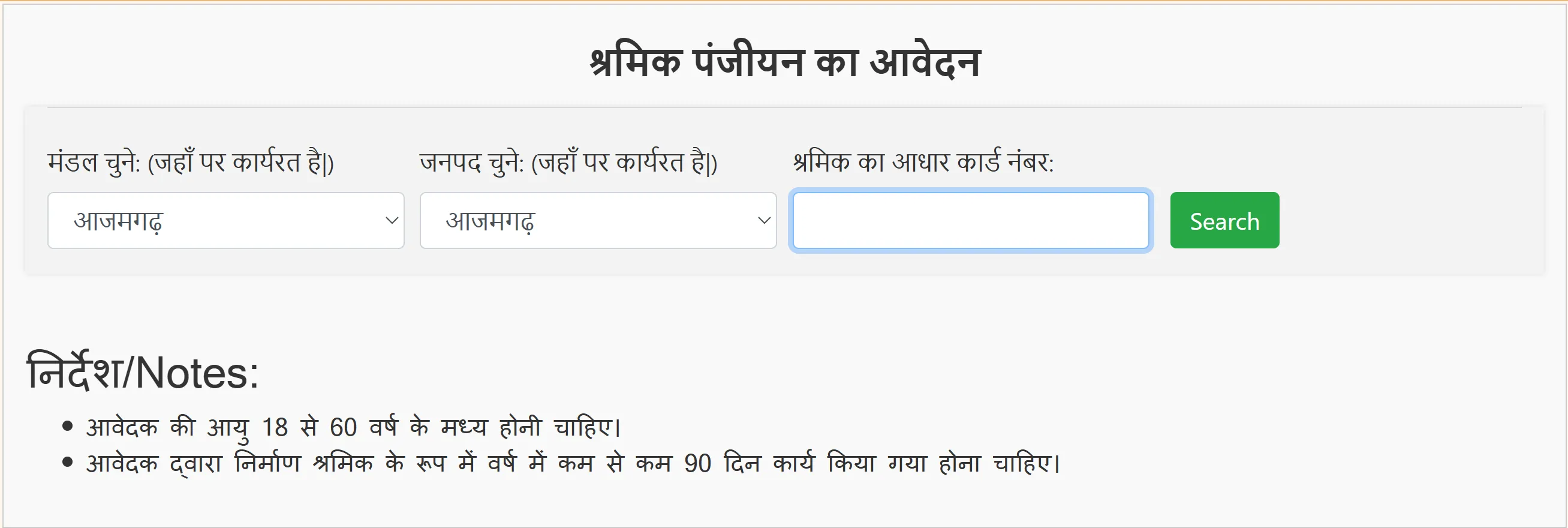
Step 3: Enter Aadhaar Number
- Enter your 12-digit Aadhaar number.
- Enter the captcha code.
- Click on "Validate Aadhaar" button.
Step 4: Aadhaar OTP Verification
- An OTP will be sent to your Aadhaar-linked mobile number.
- Enter the OTP and click on "Verify OTP".
Step 5: Fill Personal Information
- Name (auto-filled from Aadhaar)
- Date of Birth (auto-filled from Aadhaar)
- Mother's Name, Father's Name
- Gender and Category (SC/ST/OBC/General)
- Educational Qualification
Step 6: Fill Address Details
- State, District, Block, Village/City
- Pincode and complete address
Step 7: Fill Occupation and Bank Details
- Type of occupation (construction worker, domestic worker, etc.)
- Bank Name, Account Number, IFSC Code
Step 8: Upload Documents
- Scanned copy of Aadhaar Card
- Passport size photo
- Residence proof
- Worker work proof (if required)
Step 9: Submit
After filling all details, click on "Submit". Your Labour Card application will be submitted. After verification, the worker card will be issued to you.
📋 How to Check Labour Card List?
To view and check the list of Labour Card holders (Beneficiary List) in your state, follow the steps below:
Step 1: Visit State Labour Department Website
First, go to the official website of your state's labour department, for Uttar Pradesh: upbocw.in.
UP Labour Card Official WebsiteStep 2: Click on 'Labour Card List' or 'Beneficiary List'
On the homepage, click on "Labour Card List", "Beneficiary List", or "Worker List" link.
Step 3: Select District and Block
From the dropdown menu, select your district and block.
Step 4: View the List
The list of all registered workers in your selected area will be displayed. You can check your name in this list.
Step 5: Download the List (if available)
Many portals have options like "Download PDF" or "Excel Download". You can save the list to your device using this option.
Note
The Labour Card list is usually available at district and block level. In some states, you may also have the facility to search for your name in the list by registration number or mobile number.
🔄 How to Renew Labour Card?
When the validity period of the Labour Card expires, it is necessary to renew it. Follow the steps below:
Step 1: Visit State Labour Department Website
First, go to the official website of your state's labour department, for Uttar Pradesh: upbocw.in.
UP Labour Card Official WebsiteStep 2: Login to Labour Department Website
Go to your state labour department's official website and log in using your registration number and password.
Labour Card Login PageStep 3: Click on 'Renewal Application'
On the dashboard, click on "Renewal Application", "Card Renewal", or "Renewal Application" option.
Step 4: Update Required Documents
- Upload latest passport size photo
- Update bank account details (if changed)
- Update address details (if changed)
- Worker work proof (if required)
Step 5: Submit Application
After filling all information correctly, click on "Submit" button.
Step 6: Download Renewed Card After Verification
After submitting the application, the department will verify it. Once verification is complete, you can download the renewed Labour Card.
⚠️ Important Note
- Renew your Labour Card on time, otherwise benefits may stop.
- Apply before the renewal deadline.
- There is no fee for renewal.
- In some states, Aadhaar OTP verification is required again for renewal.
How to Check Labour Card Status?
Step 1: Visit State Labour Department Website
Go to your state labour department's official website.
Step 2: Click on 'Status Check' or 'Login'
On the homepage, click on "Application Status" or "Login" link.
Step 3: Enter Registration Number or Mobile Number
Enter your registration number or registered mobile number and verify with OTP.
Step 4: View Status
The current status of your application (Pending, Approved, Rejected) will be displayed.
How to Download Labour Card?
Step 1: Visit State Labour Department Website
First, go to the official website of your state's labour department, for Uttar Pradesh: upbocw.in.
UP Labour Card Official WebsiteStep 2: Login to Website
Login using your registration number and password.
Step 3: Go to Dashboard
After logging in, go to your dashboard.
Step 4: Click on Download Labour Card
Click on "Download Labour Card" or "Worker Card Download".
Step 5: Download PDF
Your Labour Card will be downloaded in PDF format. Keep a printout of it.
Benefits of Labour Card
Labour Card Helpline / Contact Details
Ministry of Labour and Employment, Government of India
| Toll-Free Helpline Number | 15520 / 1800-11-5505 |
| Email Support | support-labour@gov.in |
| UP Labour Department Website | https://upbocw.in/ |
| Central Labour Ministry Website | https://labour.gov.in/ |
Note
The Labour Card portal is completely secure. Do not share your registration number, password, or OTP with anyone. Labour Card registration and renewal are completely free; do not pay anyone.
Frequently Asked Questions (FAQs)
Question 1: How to apply for a Labour Card online?
Answer: Go to your state labour department's official website, click on the worker registration link, fill in your Aadhaar number and personal information, and submit.
Question 2: How to check the Labour Card list?
Answer: Visit your state labour department's website, click on 'Labour Card List' or 'Beneficiary List', select district and block, and view the list.
Question 3: How to renew a Labour Card?
Answer: Log in to the labour department website, click on 'Renewal Application', update required documents, and submit.
Question 4: How long does it take to get a Labour Card?
Answer: Usually, a Labour Card is issued within 30-45 days after document verification.
Question 5: Can a Labour Card be made without an Aadhaar card?
Answer: No, an Aadhaar card is mandatory for Labour Card registration.
Question 6: What are the benefits of a Labour Card?
Answer: Benefits include financial assistance, accident insurance, education scholarships, health facilities, housing schemes, and other welfare schemes.